Ways to Improve Largest Contentful Paint (LCP) Score
Improve Largest Contentful Paint (LCP) to speed up your website, reduce bounce rate, and boost Google rankings. Learn simple LCP fixes that work today.

Your website may look nice. Your content may be helpful. But if your page loads slowly, people will not wait.
Most users leave a page if it does not load fast. This is where Largest Contentful Paint (LCP) matters.
If your LCP score is poor, you are already losing visitors. You are also losing search ranking. And yes, you may be losing leads and sales too.
The worst part? Many site owners do not even know this is happening.
Let us fix that today.
What Is Largest Contentful Paint?
Largest Contentful Paint is a Core Web Vitals page speed signal.
It checks how fast the main content loads for real users.
This main content can be:
-
A big image
-
A banner
-
A video poster
-
A large text block
LCP time is counted from page open to when this content appears on the screen.
Google uses this Core Web Vitals metric to understand page loading experience and user comfort.
Ideal LCP Score
|
LCP Time |
Meaning |
|---|---|
|
Under 2.5 sec |
Fast page |
|
2.5 – 4 sec |
Needs work |
|
Above 4 sec |
Slow page |
If your site is slow, users feel it. Even if other things load.
Why You Should Care About LCP
-
Speed Is Expected: People expect to open a page and receive content quickly. Even a small delay feels annoying.
-
Users Leave Quickly: Slow pages push users away silently. Most never return again.
-
First View Builds Trust: The first loaded content sets the feeling. Late loading creates doubt.
-
Google Is Tracking: Google tracks how users react. Slow site can affect website rankings.
-
Mobile Matters More: Most users are on mobile phones. Slow mobile speed hurts more.
-
Every Second Counts: Each second of delay loses attention. That is why LCP cannot be ignored.
Ways to Improve Largest Contentful Paint Score
Let us go step by step. Simple ideas. Easy to follow.
1. Fix Slow Server Response Time
Before your page loads, the server must reply.
If the server is slow, nothing else matters, especially on mobile devices.
With Mobile First Indexing, Google checks your site from a mobile view first.
If your server responds slowly on mobile networks, Largest Contentful Paint suffers.
What you can do:
-
Use a fast hosting provider
-
Avoid shared hosting for busy sites
-
Enable server caching
A slow server delays the first byte.
And that delay negatively impacts Largest Contentful Paint, particularly for mobile users.
2. Use Proper Image Size
Large images are a common problem. Many sites upload images bigger than needed.
This makes browsers work harder. And users wait longer.
Simple fix:
-
Resize images before upload
-
Use WebP format
-
Compress images without losing clarity
Your main image should load fast. That alone can save seconds.
3. Load Only What Is Needed First
Not everything needs to load at once. But your main content does.
If scripts load before content, Largest Contentful Paint suffers.
Do this:
-
Delay non‑important JavaScript
-
Load main content first
-
Avoid heavy sliders on top sections
Think like a user. What do they want to see first? Load that.
4. Improve CSS Delivery
CSS controls how your page looks. But too much CSS can block loading.
If CSS is heavy:
-
Browser waits
-
Content waits
-
LCP slows
Better approach:
-
Remove unused CSS
-
Use inline CSS for above‑the‑fold content
-
Split large CSS files
Small CSS loads faster. And faster CSS means a faster site.
5. Avoid Large Hero Sections
Big banners look nice. But they often slow your site.
Especially when they include:
-
Sliders
-
Videos
-
Heavy animations
Ask yourself: Does this help the user? Or does it just look fancy?
A clean hero section works better. Simple text and a light image are enough.
6. Use a Content Delivery Network (CDN)
Users come from different locations. Your server may be far away.
A CDN solves this.
It stores your content in many places. So users get data from the nearest one.
This reduces load time. And helps you score a lot.
7. Set Proper Image Priority
Browsers need hints. Tell them what to load first.
Your LCP image should have priority.
How this helps:
-
Browser loads main image early
-
Other images wait
-
Page feels faster
This small change makes a big difference.
8. Reduce Third‑Party Scripts
Chat tools. Tracking tools. Ads.
Too many scripts slow pages. They block loading.
Action step:
-
Remove unused scripts
-
Load scripts after content
-
Keep only what matters
9. Improve Font Loading
Fonts also affect it. Especially if text is your main content.
Slow fonts cause blank text. Users stare at empty space.
Fix this by:
-
Using system fonts
-
Preloading main fonts
-
Avoiding too many font styles
Readable text should appear fast. That keeps users calm.
10. Test LCP on Real Pages
Do not guess. Always test.
Use tools like:
-
PageSpeed Insights
-
Search Console
Check for:
-
Home page
-
Top landing pages
-
High traffic blogs
Fix pages that matter most first. That gives quicker results.
Common LCP Mistakes to Avoid
-
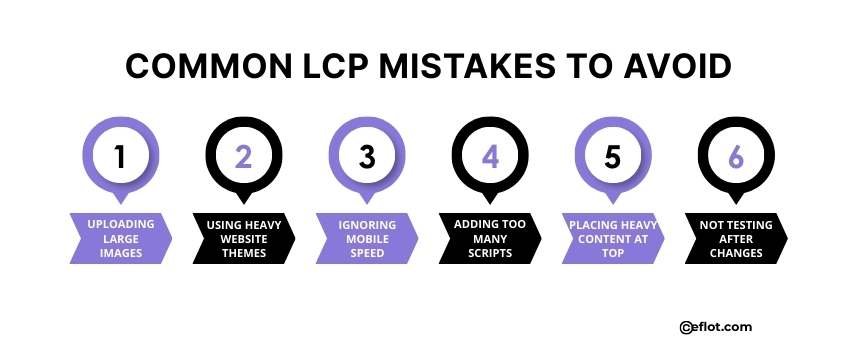
Uploading Large Images: Many websites upload images directly from design tools or cameras without resizing them first. These large image files take longer to download in the browser. As a result, the main content appears late and LCP becomes slow.
-
Using Heavy Website Themes: Some website themes come with many effects, sliders, and extra code that are not really needed. All this extra weight makes the page load slower than expected. This delay directly affects the Largest Contentful Paint score.
-
Ignoring Mobile Speed: Many site owners check speed only on desktop screens and feel satisfied with the result. Mobile users often face slower internet and weaker devices. Because of this, it becomes much slower on mobile.
-
Adding Too Many Scripts: Chat widgets, tracking tools, ads, and plugins all add extra scripts to the page. When too many scripts load together, they block the main content from loading early. This increases LCP time and hurts user experience.
-
Placing Heavy Content at the Top: Videos, sliders, and animated banners are heavy and take time to load fully. When these elements are placed at the top of the page, they become the LCP element. This makes the page feel slow right from the start.
-
Not Testing After Changes: Many websites add new features or content without checking page speed again. Small changes slowly increase load time over days or weeks. By the time it is noticed, it is already poor.
Largest Contentful Paint shows how users feel about your site speed. A fast Largest Contentful Paint keeps users calm, engaged, and willing to stay longer. Fixing it early helps protect traffic, rankings, and results.
Digital Marketing services in Other Locations in India
Bangalore | Hyderabad | Chennai | Pune | Ahmedabad | Coimbatore | Mumbai | Kolkata | Patna | Amritsar | Indore | Kozhikode | Trivandrum | Jaipur | Nagpur | Gwalior | Dehradun | Noida | Vizag | Raipur | Agra | Gurgaon | Madurai | Udaipur | Thrissur |