WordPress SEO Tips Every Business Website Should Follow
Learn essential WordPress SEO tips to improve site speed, mobile usability, themes, plugins, and overall search visibility for long-term growth and success.

WordPress websites often face challenges that affect search performance and user experience. Outdated themes and plugins can cause security risks and slow page load times, while missing metadata, broken links, or poor mobile compatibility limit visibility on search engines. Slow loading speeds, duplicate content, and unclear site structure can reduce engagement and conversions.
Implementing effective WordPress SEO through proper settings, theme selection, and performance optimizations helps businesses improve visibility, attract relevant traffic, and build a strong foundation for long-term online growth.
Why SEO Matters for Every Business Website
Search engine optimization (SEO), especially WordPress SEO, improves a website’s visibility on search engines and helps businesses connect with users who have clear search intent.
-
Improves search visibility
-
Brings relevant website traffic
-
Supports long-term growth
Effective WordPress SEO helps businesses build trust, increase brand awareness, and create a strong foundation for consistent online results.
How to Check Basic WordPress Settings for SEO
Before investing in advanced SEO tools or campaigns, it is important to ensure that your WordPress website is correctly configured at the basic level. These foundational settings directly affect how search engines crawl, index, and display your website in search results. A properly set WordPress site creates a strong base for long-term organic visibility.
Step 1: Confirm Search Engine Visibility Settings
One of the most critical checks is ensuring that your website is visible to search engines. WordPress includes a setting that can block search engines from indexing your site, often used during development.
Navigate to Settings → Reading and verify that the option “Discourage search engines from indexing this site” is unchecked.
If this setting remains enabled after launch, search engines may ignore your website entirely, preventing it from appearing in search results.
Step 2: Review and Optimize Permalink Structure
Permalinks define how your page URLs appear. Clean and readable URLs are easier for both users and search engines to understand.
Go to Settings → Permalinks and select the Post name structure. This format uses keywords instead of numbers or symbols, making URLs more meaningful and SEO-friendly.
Avoid changing permalinks frequently on an existing website, as this can lead to broken links and ranking drops if not managed properly.
Step 3: Ensure Proper Site Title and Tagline Configuration
Your site title and tagline help search engines understand your brand and website purpose. These elements often appear in search results and browser tabs.
Under Settings → General, ensure your site title accurately reflects your business name, and your tagline clearly explains what your business offers.
Keep both concise and relevant, as overly long or unclear titles reduce visibility and click-through rates.
Step 4: Install and Configure an SEO Plugin
An SEO plugin allows better control over how your website appears in search results. It helps manage metadata, indexing rules, and sitemap generation without technical complexity.
Once installed, review default settings carefully. Make sure important pages are set to index, metadata fields are enabled, and XML sitemaps are active.
A properly configured plugin ensures consistency across all pages and improves search engine understanding of your site structure.
Step 5: Check Indexing and Crawling Preferences
WordPress automatically generates category, tag, author, and archive pages. Not all of these pages add SEO value.
Review which pages should be indexed and which should not. Limiting low-value pages from indexing reduces duplicate content issues and helps search engines focus on your most important pages, such as services, products, and key landing pages.
Step 6: Verify Mobile and Accessibility Readiness
Search engines prioritize websites that provide a smooth experience across all devices, making mobile responsiveness a key factor in WordPress SEO. WordPress settings and themes should support mobile-friendly design by default.
Test your website on different screen sizes to ensure text, buttons, and menus function correctly. A mobile-friendly website not only improves user engagement but also strengthens search engine rankings.
Step 7: Enable Basic Security and Performance Settings
Secure and stable websites perform better in search results. Ensure your website uses HTTPS and that basic performance settings such as caching and image optimization are in place.
These elements improve page load times, reduce bounce rates, and increase overall site trust, all of which support SEO performance over time.
How to Choose an SEO-Friendly WordPress Theme
-
Theme Performance: Your WordPress theme directly affects website speed and overall SEO performance. A well-coded theme loads quickly and reduces unnecessary scripts that can slow down your site.
-
Mobile Compatibility: An SEO-friendly theme must be fully responsive. It should adapt smoothly to different screen sizes and devices, as mobile usability is a key ranking factor for search engines.
-
Clean Code Structure: Themes built with clean and structured code make it easier for search engines to crawl and understand your website content, which is essential for WordPress SEO. Poorly coded themes can create technical issues that negatively affect search rankings and site performance.
-
Regular Updates: Themes that receive regular updates stay compatible with the latest WordPress versions. Updates also improve security and prevent technical SEO errors over time.
-
Plugin Compatibility: Your theme should work smoothly with popular SEO plugins. This allows proper control over page titles, meta descriptions, and other essential SEO elements.
-
Avoid Overdesign: Themes with heavy animations, sliders, or unnecessary features increase load time. Simple and lightweight designs improve both user experience and search visibility.
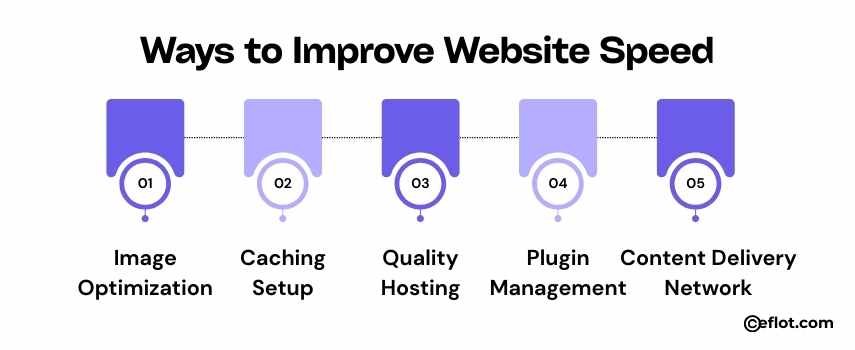
Ways to Improve Website Speed
-
Image Optimization: Large images slow down websites. Using compressed and properly sized images helps pages load faster and improves performance.
-
Caching Setup: Caching stores static versions of your pages, reducing server load and improving page speed for returning visitors.
-
Quality Hosting: A reliable hosting provider ensures faster server response times, which is crucial for WordPress SEO and overall website performance. Poor hosting can slow down your site, reducing both user experience and search engine rankings, even if other optimizations are in place.
-
Plugin Management: Unused or outdated plugins create performance issues. Removing unnecessary plugins reduces background processes and improves speed.
-
Content Delivery Network: A CDN distributes website content across multiple servers. This reduces load time by delivering data from the closest server to the user.
Common SEO Mistakes and How to Avoid Them
-
Weak Keyword Targeting: Ignoring keyword research leads to content that does not match user searches. Always align content with relevant and realistic search terms.
-
Duplicate Content: Repeated content across pages confuses search engines. Ensure each page has unique and valuable information.
-
Missing Meta Data: Pages without proper titles and descriptions lose visibility. Meta data helps search engines understand page relevance.
-
Poor Mobile Experience: Websites that do not function well on mobile devices risk lower rankings and reduced engagement.
-
Broken Links: Broken internal or external links harm user experience and SEO trust. Regular link checks help maintain site quality.
-
Slow Page Speed: Slow-loading pages increase bounce rates. Ongoing performance checks help keep your website optimized.
WordPress SEO success starts with strong foundations and consistent best practices. By optimizing settings, themes, and performance, businesses can improve search visibility and enhance user experience. Regular audits and ongoing improvements help maintain stable rankings and support long-term website growth.
Digital Marketing services in Other Locations in India
Bangalore | Hyderabad | Chennai | Pune | Ahmedabad | Coimbatore | Mumbai | Kolkata | Patna | Amritsar | Indore | Kozhikode | Trivandrum | Jaipur | Nagpur | Gwalior | Dehradun | Noida | Vizag | Raipur | Agra | Gurgaon | Madurai | Udaipur | Thrissur |