
















How Google Analytics Helps Measure Marketing Performance
Learn how Google Analytics helps measure marketing performance by tracking traffic, user behavior, conversions, SEO results, and campaign success easily and clearly.
It is not easy to know if your marketing efforts are really working. You may be doing SEO, running ads, or sharing content, but without tracking, results are unclear. Google Analytics helps solve this problem by showing real performance data.
Google Analytics shows how visitors reach your website and what they do there. It helps track traffic, user actions, and conversions in a simple way. This makes it easier to improve marketing strategies and focus on what works best.
What Is Google Analytics?
Google Analytics is a powerful tracking tool used to measure website traffic and user activity. It helps businesses understand how visitors find and use their website. This makes it an essential tool for Digital Marketing Agencies and marketers.
-
Overview of Google Analytics: Google Analytics collects data about website visitors, including traffic sources, pages visited, and user actions. This data helps businesses measure the effectiveness of their Digital Marketing efforts.
-
Purpose of Google Analytics: The main goal is to track and analyze website performance. It helps marketers understand what attracts users and what encourages them to convert.
-
Universal Analytics vs GA4: GA4 focuses more on user behavior and events rather than sessions. It provides better tracking across websites and apps, making it more suitable for modern Digital Marketing.
-
Why GA4 matters today: GA4 offers advanced insights like predictive metrics and better privacy controls. These features help businesses adapt to changing data regulations.
-
Importance for marketers: Google Analytics is essential for SEO Services, paid ads, and content marketing. It helps measure success and improve marketing strategies continuously.
Setting Up Google Analytics for Accurate Tracking
Accurate data starts with proper setup. If Google Analytics is not configured correctly, the insights may be misleading. Proper setup ensures reliable performance measurement.
-
Creating a GA4 property: Setting up a GA4 property is the first step in tracking user activity. It allows businesses to collect modern, event-based data for better analysis.
-
Installing tracking codes correctly: The tracking code must be added to all website pages. Incorrect installation can lead to missing or inaccurate data in reports.
-
Using Google Tag Manager: Tag Manager simplifies event tracking without editing code repeatedly. It helps Digital Marketing Agencies manage multiple tracking tags efficiently.
-
Linking with Google Ads: Connecting Google Analytics with Google Ads helps measure ad performance. It shows which ads drive quality traffic and conversions.
-
Connecting Search Console: Linking Search Console allows marketers to analyze SEO performance. It helps track keyword impressions, clicks, and organic traffic trends.
Understanding Key Google Analytics Metrics
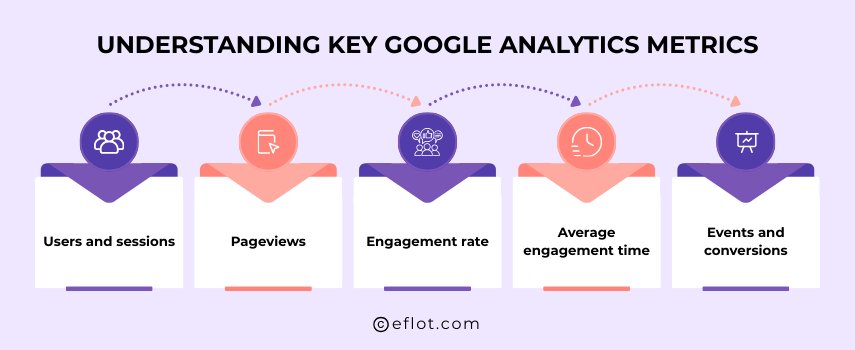
Metrics are the foundation of performance analysis. Google Analytics provides multiple metrics that help evaluate Digital Marketing success clearly.
-
Users and sessions: Users represent individual visitors, while sessions track visits. Understanding this difference helps measure audience size and engagement accurately.
-
Pageviews: Pageviews show how often pages are viewed. High pageviews indicate strong interest, especially for SEO-optimized content.
-
Engagement rate: Engagement rate measures meaningful user interactions. It helps marketers understand whether users find the content valuable.
-
Average engagement time: This metric shows how long users stay on the site. Longer engagement usually indicates better content quality and user experience.
-
Events and conversions: Events track actions like clicks and form submissions. Conversions measure goal completions, linking marketing efforts to business results.
Tracking Traffic Sources and Channels
In Digital Marketing, knowing where website visitors come from is very important. Traffic source tracking helps businesses understand which channels bring real users. Google Analytics makes this easy by clearly showing all traffic sources.
-
Organic search traffic (SEO): Organic traffic shows visitors coming from search engines. This helps businesses measure how well their SEO Services and keyword strategies are performing over time.
-
Paid advertising traffic: Paid traffic comes from Google Ads and social ads. Tracking this helps Digital Marketing Agencies understand which paid campaigns bring quality traffic.
-
Social media traffic: Social traffic shows visitors from platforms like Facebook and Instagram. This helps evaluate social media marketing effectiveness and engagement.
-
Referral traffic: Referral traffic comes from other websites. It helps measure backlink quality and brand visibility across external platforms.
-
Direct traffic insights: Direct traffic shows users who type the website URL directly. High direct traffic usually indicates strong brand awareness and trust.
Measuring Campaign Performance Using UTM Parameters
Campaign tracking is essential to understand which marketing efforts work best. UTM parameters help track specific campaigns accurately. They play a key role in measuring ROI for Digital Marketing campaigns.
-
What are UTM parameters: UTM parameters are small tags added to URLs. They help Google Analytics identify campaign source, medium, and name clearly.
-
Tracking campaign sources: UTMs show whether traffic comes from email, ads, or social media. This helps compare performance across Digital Marketing Services.
-
Campaign performance analysis: Campaign reports show which promotions bring engagement and conversions. This helps marketers repeat successful strategies.
-
Measuring campaign ROI: By combining campaign data with conversions, marketers can measure returns accurately. This ensures better budget allocation.
-
Avoiding tracking errors: Incorrect or inconsistent UTM naming creates data confusion. Standard naming ensures clean and reliable reports.
Measuring User Behavior and Engagement
User behavior shows how visitors interact with a website. Understanding this helps improve content, SEO, and user experience. Google Analytics provides detailed behavior insights.
-
Page-level performance: This shows which pages attract visitors and which cause exits. It helps optimize content for better engagement and SEO results.
-
User flow analysis: User flow shows how visitors move across pages. This helps identify drop-off points and improve navigation.
-
Event tracking: Events track actions like button clicks and scrolls. This gives deeper insight into user engagement beyond pageviews.
-
Engagement time analysis: Engagement time shows how long users stay active. Longer time usually indicates relevant and valuable content.
-
Understanding user intent: Behavior data helps identify what users are looking for. This helps improve content and conversion strategies.
Conversion Tracking and Goal Measurement
Conversions show whether marketing efforts bring real business results. Tracking goals helps measure leads, sales, and actions clearly. This is essential for any Digital Marketing Agency.
-
Defining business goals: Goals should match business objectives like leads or sales. Clear goals ensure meaningful performance tracking.
-
Setting up conversions: Google Analytics allows event-based conversion tracking. This makes it easier to track multiple user actions.
-
Tracking lead generation: Form submissions and calls can be tracked. This helps measure lead quality and campaign success.
-
Ecommerce tracking: Ecommerce reports show revenue and product performance. This helps optimize online sales strategies.
-
Analyzing conversion paths: Conversion paths show how users convert across channels. This helps improve multi-channel marketing strategies.
Audience Insights and Segmentation
Understanding the audience improves targeting and personalization. Google Analytics provides valuable insights into user demographics and behavior.
-
Demographic insights: Age and gender data help create relevant marketing messages. This improves engagement and conversions.
-
Geographic insights: Location data helps improve local SEO and regional targeting. It supports location-based marketing strategies.
-
Device usage behavior: Device data shows whether users visit via mobile or desktop. This helps improve website experience.
-
New vs returning users: This data helps understand user loyalty and retention. It supports remarketing strategies.
-
Audience segmentation: Segments help analyze specific user groups. This improves personalization and campaign targeting.
Measuring Marketing ROI with Google Analytics
ROI measurement connects marketing efforts with business outcomes. Google Analytics helps measure returns across SEO, ads, and content marketing.
-
Linking marketing to revenue: Analytics shows which channels generate conversions. This helps identify high-performing Digital Marketing Services.
-
Understanding attribution models: Attribution shows how different channels contribute to conversions. This avoids overvaluing only last-click results.
-
Assisted conversion analysis: Assisted conversions show supporting channels. This highlights the importance of SEO and content marketing.
-
Cost vs performance tracking: Comparing cost with results helps optimize marketing budgets. This improves efficiency and ROI.
-
Improving long-term profitability: ROI insights help scale successful strategies. This supports sustainable Digital Marketing growth.
Using Google Analytics Reports for Better Decisions
In Digital Marketing, data is useful only when it helps make better decisions. Google Analytics reports turn raw numbers into clear insights about traffic, user behavior, and conversions. Digital Marketing Agencies use these reports to improve SEO, ads, and overall marketing strategies.
-
Standard reports overview: Google Analytics provides ready-made reports for traffic, engagement, and conversions. These reports give a quick understanding of how different Digital Marketing Services are performing without complex setup.
-
Traffic and channel reports: Channel reports show where users come from, such as SEO, paid ads, or social media. This helps marketers understand which channels bring quality traffic and which need improvement.
-
Engagement and behavior reports: These reports explain how users interact with the website. Marketers can see which pages users like, where they spend time, and where they leave, helping improve content and SEO Services.
-
Conversion and goal reports: Conversion reports connect marketing efforts with business results. They show how many users complete actions like form fills, calls, or purchases.
-
Decision-making using insights: By analyzing reports regularly, businesses can make smarter decisions. They can optimize campaigns, improve user experience, and focus on high-performing Digital Marketing strategies.
Common Google Analytics Mistakes Marketers Should Avoid
Google Analytics is powerful, but mistakes can lead to wrong conclusions. Many marketers collect data but fail to use it correctly. Avoiding common errors helps ensure accurate performance measurement in Digital Marketing.
-
Incorrect tracking setup: If Google Analytics is not set up properly, data may be incomplete or inaccurate. This leads to wrong analysis and poor decisions for SEO and paid campaigns.
-
Focusing only on traffic numbers: High traffic does not always mean success. Marketers should also analyze engagement, conversions, and user behavior to measure real performance.
-
Ignoring conversion tracking: Without tracking conversions, it is impossible to measure ROI. This makes it difficult for a Digital Marketing Agency to prove the value of its services.
-
Misinterpreting data: Looking at data without context can be misleading. Marketers should compare trends, time periods, and sources before making decisions.
-
Not reviewing data regularly: Analytics data should be reviewed consistently. Ignoring reports for long periods can result in missed opportunities and unresolved issues.
Best Practices for Using Google Analytics Effectively
Using Google Analytics correctly helps businesses grow steadily. Following best practices ensures accurate insights and better Digital Marketing performance. These practices are useful for both beginners and experienced marketers.
-
Set clear goals and KPIs: Clear goals help measure success properly. Whether it is lead generation or sales, goals should align with business objectives.
-
Track relevant metrics only: Not all metrics matter for every business. Marketers should focus on metrics that support SEO Services, conversions, and engagement.
-
Review reports consistently: Regular analysis helps identify trends early. This allows marketers to optimize campaigns and content before problems grow.
-
Combine analytics with other tools: Using Google Analytics along with SEO tools and ad platforms gives deeper insights. This improves overall Digital Marketing strategy.
-
Use insights for continuous improvement: Analytics data should guide action. Testing, optimizing, and improving based on insights leads to long-term growth and better results.
Google Analytics helps businesses understand how their Digital Marketing is performing. It shows where website visitors come from and how they behave on the site. Marketers can track SEO, campaigns, and conversions easily. This data helps improve marketing strategies and reduce wasted effort. Overall, Google Analytics supports smarter decisions and steady business growth.
Digital Marketing services in Other Locations in India
Bangalore | Hyderabad | Chennai | Pune | Ahmedabad | Coimbatore | Mumbai | Kolkata | Patna | Amritsar | Indore | Kozhikode | Trivandrum | Jaipur | Nagpur | Gwalior | Dehradun | Noida | Vizag | Raipur | Agra | Gurgaon | Madurai | Udaipur | Thrissur |