
















Top SEO Tools and Plugins for WordPress Sites
Optimize your WordPress site with the best SEO plugins. Boost rankings, drive traffic, and simplify your SEO strategy for better online results.

When it comes to making your WordPress site stand out online, search engine optimization (SEO) is essential. Whether you're running a personal blog, a small business website, or an e-commerce store, SEO ensures your content reaches the right audience at the right time. For many website owners, especially those new to SEO, managing all the complexities of optimization can feel overwhelming. That’s where SEO plugins for WordPress come into play they simplify the process, saving you time while delivering measurable results.
As someone who’s been working in digital marketing for years, I’ve seen how the right SEO plugins can completely transform a website’s performance. I remember one client who was running an online clothing store but struggled to appear in Google’s search results. They had no idea how to optimize their pages for keywords or fix technical issues on their site. By implementing SEO plugins like Yoast SEO and Rank Math, we were able to improve their rankings, bring in more traffic, and boost sales all without requiring them to learn coding or complex optimization techniques. With the right tools and strategies, optimizing your site doesn’t have to be a difficult task. Here are why these plugins are a must-have for WordPress users aiming to grow their online presence.
What Makes SEO Plugins for WordPress Essential?
SEO plugins are essential for WordPress sites because they simplify and enhance the process of optimizing your site for search engines. Here’s why they’re essential:
1. Automate Complex SEO Tasks
SEO plugins automate tasks like meta tag creation, XML sitemap generation, and keyword analysis, saving time and effort.
2. Improve Content Quality
Plugins like Yoast SEO analyze your content for readability and keyword usage, helping you create engaging and optimized posts.
3. Enhance Technical SEO
Advanced plugins address technical aspects of SEO, such as canonical tags, structured data, and redirects, ensuring your site meets search engine requirements.
4. Boost Rankings and Traffic
By optimizing your site’s on-page and technical SEO, these plugins help improve search engine rankings and drive organic traffic.
5. User-Friendly for Beginners
Most SEO plugins feature intuitive dashboards, making it easy for beginners to implement SEO strategies without technical expertise.
With their ability to streamline SEO efforts, plugins are a must-have tool for any WordPress site owner.
How to Choose the Right SEO Plugin for Your Site
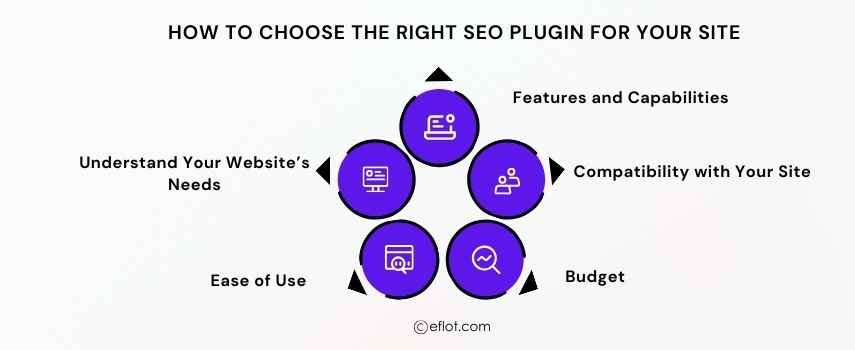
Choosing the right SEO plugin for your WordPress site is critical for improving your website's visibility, driving traffic, and ensuring long-term success. With countless options available, it can feel overwhelming to determine which plugin is best suited for your needs. However, by focusing on a few key factors, you can simplify the decision-making process.
1. Understand Your Website’s Needs
The first step is identifying your website’s specific requirements. If you're running a blog, you might prioritize content optimization and readability analysis. For e-commerce websites, features like WooCommerce integration and product schema markup are crucial. Knowing your goals ensures you choose a plugin tailored to your objectives.
2. Ease of Use
If you're new to SEO, opt for a plugin with a simple and user-friendly interface. Plugins like Yoast SEO and Rank Math provide easy-to-travel dashboards, making them suitable for beginners. Advanced users might prefer plugins with more customization options.
3. Features and Capabilities
Look for plugins offering essential features like keyword optimization, XML sitemaps, schema markup, and meta-tag editing. Additional tools like internal linking suggestions, image optimization, and performance tracking can further enhance your SEO efforts.
4. Compatibility with Your Site
Ensure the plugin integrates well with your WordPress theme and other plugins. Poor compatibility can lead to technical glitches and negatively impact your website’s performance.
5. Budget
While many SEO plugins offer free versions, premium plans unlock advanced features like keyword tracking and analytics. Evaluate your budget and decide whether the free version meets your needs or if investing in a premium plan is worthwhile.
By considering these factors, you can confidently choose the right SEO plugin to help your site achieve its goals.
Top 10 SEO Plugins for WordPress Sites
1. Yoast SEO
Yoast SEO is a widely popular plugin that simplifies content optimization.
-
Features: Real-time content analysis, readability scores, and XML sitemap generation.
-
Why It’s Great: Perfect for beginners with its user-friendly interface and step-by-step guidance.
2. Rank Math
Rank Math offers a comprehensive suite of SEO tools.
-
Features: Built-in schema generator, keyword tracking, and internal linking suggestions.
-
Why It’s Great: Ideal for users looking for advanced features at no cost.
3. All-in-One SEO Pack (AIOSEO)
AIOSEO is an excellent choice for those seeking an all-in-one solution.
-
Features: Local SEO, social media integration, and WooCommerce support.
-
Why It’s Great: Easy to use for small businesses and e-commerce sites.
4. SEOPress
SEOPress is a lightweight yet powerful plugin for WordPress.
-
Features: Unlimited keyword analysis, redirection management, and sitemaps.
-
Why It’s Great: Budget-friendly with robust free features.
5. WP Rocket
WP Rocket focuses on improving your site’s performance for better SEO.
-
Features: Caching, lazy loading, and database optimization.
-
Why It’s Great: Improves site speed, a critical ranking factor.
6. Schema Pro
Schema Pro is perfect for adding structured data to your site.
-
Features: Custom schema types and automatic implementation.
-
Why It’s Great: Enhances search appearance with rich snippets.
7. Broken Link Checker
This plugin monitors and fixes broken links on your site.
-
Features: Automatic detection and easy URL replacement.
-
Why It’s Great: Helps improve user experience and avoid penalties.
8. Redirection
Redirection is a powerful tool for managing 301 redirects.
-
Features: Tracks 404 errors and monitors URL changes.
-
Why It’s Great: Ensures users are directed to the right pages, improving SEO.
9. MonsterInsights
MonsterInsights integrates Google Analytics into your WordPress site.
-
Features: Real-time analytics, audience insights, and performance tracking.
-
Why It’s Great: Helps you make data-driven decisions to improve your SEO strategy.
10. WP Meta SEO
WP Meta SEO simplifies bulk SEO updates for large websites.
-
Features: Bulk editing for meta titles, descriptions, and image optimization.
-
Why It’s Great: Saves time by allowing quick SEO fixes across multiple pages.
How Word Press Plugins Are Tested and Reviewed
Testing and reviewing WordPress plugins involves a thorough evaluation of their features, usability, and performance. Here's how we assess SEO plugins for WordPress:
1. Installation and Setup
We start by evaluating how easy it is to install and set up the plugin. Plugins with a simple onboarding process and clear instructions receive higher ratings.
2. Core Features
The plugin’s primary features are tested to ensure they deliver as promised. For example, in an SEO plugin, we test keyword optimization, meta-tag editing, and sitemap generation.
3. Usability and User Interface
A well-designed user interface is crucial for ease of use. We assess whether the plugin is intuitive and user-friendly, especially for beginners.
4. Performance Impact
Plugins should not slow down your website. We monitor load times and overall site performance after installing the plugin to ensure it doesn’t affect user experience.
5. Customer Support
Reliable customer support is essential for troubleshooting issues. We evaluate the responsiveness and helpfulness of the plugin’s support team.
6. Pricing and Value
We analyze whether the plugin’s features justify its pricing, focusing on the free version and premium plans. These tests ensure that our plugin recommendations are reliable, effective, and user-friendly.
Case Studies
Case Study1:
Nature's Nurture, an e-commerce store specializing in organic skincare products, was struggling to attract customers despite offering high-quality products. Their website lacked optimization for search engines, making it difficult for potential customers to find their products online.
Challenges
-
Poor rankings for keywords like “organic face cream” and “natural skincare.”
-
Lack of meta tags and proper URL structures.
-
Slow website speed, causing high bounce rates.
Solution
The store implemented Rank Math, one of the most advanced SEO plugins for WordPress. Rank Math allowed them to identify the keywords their target audience was searching for and optimize their product pages accordingly. The plugin’s schema markup feature was used to showcase star ratings and product prices in search results. Additionally, WP Rocket was installed to improve site speed by enabling caching and compressing large files.
Results
-
Achieved a 200% increase in organic traffic within five months.
-
Product pages ranked on the first page of Google for high-value keywords.
-
Reduced bounce rate by 40% due to faster loading speeds, increasing customer engagement and sales.
Case Study2:
FitFlex Wearables, a company offering smart fitness gadgets, was struggling to gain visibility in a competitive market. Their product pages weren’t optimized for SEO, and their website wasn’t mobile-friendly, leading to low search rankings and poor user engagement.
Challenges
-
Difficulty ranking for competitive keywords like “best fitness trackers” and “affordable smartwatches.”
-
High bounce rates due to poor page speed and user experience.
-
Lack of structured data for product reviews and descriptions.
Solution
FitFlex Wearables used All in One SEO (AIOSEO) to optimize their website for SEO. AIOSEO’s WooCommerce integration helped optimize product descriptions, add meta tags, and ensure search engines indexed their inventory correctly. They also implemented WP Rocket to improve page loading speeds and enhance mobile-friendliness. Product schema was added to showcase star ratings and reviews directly in search results, increasing click-through rates.
Results
-
A 300% growth in organic search traffic within six months.
-
Ranked in the top three search results for keywords like “affordable fitness trackers.”
-
Improved mobile user engagement by 40%, leading to higher conversions and a 35% increase in sales.
Choosing the right SEO plugins for WordPress can make a significant difference in your site’s performance and visibility. From content optimization to technical SEO, these plugins offer a wide range of tools to simplify the process and achieve better search rankings. By testing and reviewing plugins based on your site’s needs, you can find the perfect fit to drive traffic, boost engagement, and grow your online presence. Start exploring these tools, and take your WordPress site to new heights with smarter SEO strategies.
Digital Marketing services in Other Locations in India
Bangalore | Hyderabad | Chennai | Pune | Ahmedabad | Coimbatore | Mumbai | Kolkata | Patna | Amritsar | Indore | Kozhikode | Trivandrum | Jaipur | Nagpur | Gwalior | Dehradun | Noida | Vizag | Raipur | Agra | Gurgaon | Madurai | Udaipur | Thrissur |