Technical SEO Tips to Improve Website Performance
Improve your website’s speed, usability, and search rankings with simple technical SEO tips that improve performance and user experience effectively.

Having good content on your website is important, but it’s not enough. If your website is slow, hard to use, or difficult for search engines to understand, people may leave, and your site won’t rank well. Technical SEO focuses on fixing these behind-the-scenes issues so your website works better, loads faster, and is easier for both visitors and search engines to use.
Technical SEO includes things like improving website speed, making your site mobile-friendly, fixing broken links, and organizing your pages properly. Paying attention to these details helps your website get more visitors, keeps them engaged, and supports other Digital Marketing Services to grow your business online.
What is Technical SEO?
Technical SEO is a specialized part of Digital Marketing that focuses on improving the backend and infrastructure of a website. While content SEO targets keywords, blogs, and on-page content, technical SEO ensures your website is accessible, fast, and easy to navigate for both users and search engines.
-
Website Crawlability: Search engines use bots to crawl websites. Technical SEO ensures these bots can access every important page, avoiding issues like blocked pages or broken links.
-
Indexing: Even if your site has great content, it won’t appear in search results unless it is properly indexed. Technical SEO ensures all valuable pages are recognized by search engines.
-
Site Architecture: A well-structured website helps search engines understand which pages are most important. This involves proper use of categories, subcategories, and internal linking.
-
Performance and Security: Technical SEO also focuses on page speed, mobile-friendliness, and secure connections (HTTPS), which are ranking factors in Google’s algorithm.
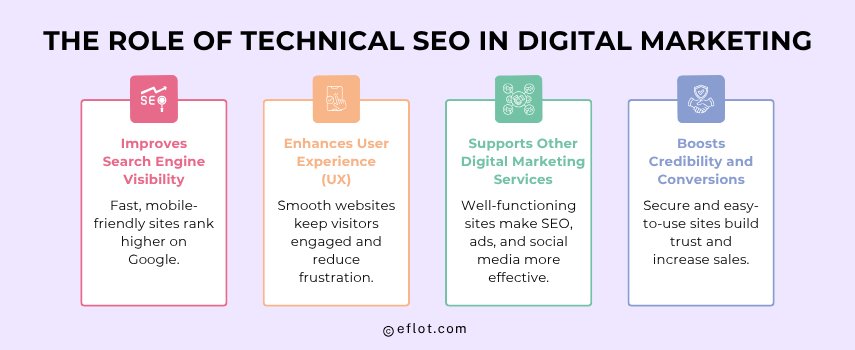
The Role of Technical SEO in Digital Marketing
Technical SEO is important for a Digital Marketing Agency because it forms the backbone of all online marketing efforts. Without technical optimization, other strategies like SEO, content marketing, or paid ads may not achieve their full potential.
-
Improves Search Engine Visibility: Google prefers websites that load quickly, are mobile-friendly, and have structured data. Optimizing technical SEO directly improves your chances of ranking higher.
-
Enhances User Experience (UX): Slow websites or broken pages frustrate users. A technically optimized website reduces bounce rates and keeps visitors engaged.
-
Supports Other Digital Marketing Services: SEO campaigns, social media promotions, and paid ads are more effective when the website functions well.
-
Boosts Credibility and Conversions: Secure websites (HTTPS), fast-loading pages, and intuitive navigation increase trust, which can lead to more leads and sales.
Core Technical SEO Tips to Boost Website Performance
Technical SEO is essential for improving your website’s performance, helping it rank higher on search engines, and providing a better experience for users. Focusing on core technical SEO aspects ensures that your site is fast, secure, and easy to navigate, which directly impacts your Digital Marketing Services success.
Here are the most important technical SEO tips in detail:
1. Improve Website Speed
Website speed is a critical factor in Search Engine Optimization. Slow-loading websites frustrate users and increase bounce rates.
Tips to improve speed:
-
Compress images without losing quality using tools like TinyPNG or WebP format.
-
Minify CSS, JavaScript, and HTML files to reduce unnecessary code.
-
Enable browser caching so returning visitors can load pages faster.
-
Use a Content Delivery Network (CDN) to serve website content quickly worldwide.
-
Remove unnecessary plugins or scripts that slow down your site.
Why it matters: Faster websites improve rankings and keep visitors engaged, increasing the chances of conversions.
2. Make Your Website Mobile-Friendly
More than half of web traffic comes from mobile devices, so a mobile-friendly site is essential.
Tips to optimize for mobile:
-
Use a responsive design that automatically adjusts to different screen sizes.
-
Avoid pop-ups that cover content on mobile screens.
-
Ensure buttons and links are easily clickable on small screens.
-
Test your website using Google’s Mobile-Friendly Test tool.
Why it matters: Google uses mobile-first indexing, meaning your mobile site version determines your search ranking.
3. Use HTTPS for Website Security
A secure website builds trust with visitors and search engines.
Tips to secure your site:
-
Install an SSL certificate to encrypt data between your server and users.
-
Redirect all HTTP pages to HTTPS to avoid duplicate content issues.
-
Ensure external scripts and resources are also loaded via HTTPS.
Why it matters: HTTPS is a ranking factor and increases user confidence, especially on e-commerce sites.
4. Optimize XML Sitemaps
An XML sitemap helps search engines find and index all important pages on your website.
Tips for sitemap optimization:
-
Include only high-value pages, excluding duplicates or low-quality content.
-
Update the sitemap regularly as new pages are added.
-
Submit your sitemap to Google Search Console for better indexing.
Why it matters: A well-structured sitemap ensures that search engines can easily discover and index your content.
5. Manage Robots.txt Effectively
The robots.txt file tells search engines which pages to crawl and which to avoid.
Tips for robots.txt management:
-
Avoid blocking important pages accidentally.
-
Use it to prevent search engines from crawling duplicate or low-value pages.
-
Regularly review and update the file when making site changes.
Why it matters: Proper robots.txt management ensures that search engines focus on your most important content.
6. Fix Broken Links
Broken links harm SEO and user experience by leading visitors to non-existent pages.
Tips to fix broken links:
-
Regularly scan your website for broken internal and external links using tools like Screaming Frog.
-
Update outdated links or redirect them to relevant pages.
-
Monitor external links to avoid linking to broken or spammy sites.
Why it matters: Fixing broken links improves crawlability, keeps users engaged, and maintains your website authority.
7. Implement Structured Data (Schema Markup)
Structured data helps search engines understand the content of your pages.
Tips for structured data:
-
Use schema for products, articles, events, reviews, FAQs, and other content types.
-
Validate schema using Google’s Rich Results Test tool.
-
Update structured data when you add new content or make changes.
Why it matters: Structured data can enhance your search listings with rich snippets, increasing click-through rates.
8. Optimize Images
Images improve user experience but can also slow down your website if not optimized.
Tips for image optimization:
-
Use descriptive file names and alt text for SEO benefits.
-
Compress images to reduce file size without losing quality.
-
Implement lazy loading so images load only when users scroll to them.
Why it matters: Optimized images improve page speed, accessibility, and search engine understanding.
9. Enhance Internal Linking
Internal linking helps search engines understand your website structure and distributes page authority.
Tips for internal linking:
-
Link related pages naturally within your content.
-
Use descriptive anchor text with relevant keywords.
-
Avoid overloading pages with too many links, which can confuse users and bots.
Why it matters: Strong internal linking improves SEO, navigation, and the visibility of important pages.
Additional Technical SEO Considerations
Beyond the basics, advanced technical SEO strategies help ensure long-term success and improve overall website performance:
-
Canonical Tags: These tags tell search engines which version of a page is the main one. This prevents duplicate content issues, which can negatively impact rankings. Using canonical tags is especially important for e-commerce sites with similar product pages.
-
Clean URL Structure: Short, descriptive, and keyword-friendly URLs are easier for users to remember and for search engines to index. Avoid long URLs with unnecessary numbers or symbols.
-
Pagination & Infinite Scroll: Websites with a lot of content, like blogs or e-commerce catalogs, should be structured so search engines can crawl all pages. Proper pagination or using SEO-friendly infinite scroll ensures no content is left unindexed.
-
Server Performance: A slow or unreliable server can hurt your website speed and availability. Using quality hosting and optimizing server response times helps improve rankings and user experience.
-
Core Web Vitals: These are Google metrics that measure user experience, including Largest Contentful Paint (LCP), First Input Delay (FID), and Cumulative Layout Shift (CLS). Optimizing these ensures your pages load quickly, respond fast, and remain visually stable.
-
Breadcrumbs: Breadcrumb navigation helps users understand where they are on a website and improves site structure for search engines. It also increases internal linking, which can improve SEO.
-
AMP (Accelerated Mobile Pages): AMP pages load faster on mobile devices, improving user experience and potentially boosting rankings. They are especially useful for content-heavy sites like blogs and news portals.
-
HTTPS Security: Websites without HTTPS are considered insecure by browsers. Using HTTPS protects user data and boosts trust, which indirectly benefits SEO.
-
Robust Internal Linking: Linking between related pages helps search engines understand site structure, distributes link authority, and improves overall crawlability.
-
Image and Video Optimization: Optimizing media files with alt text, descriptive filenames, and proper compression improves page load speed and accessibility.
Tools for Technical SEO Success
The right tools simplify technical SEO and help monitor performance efficiently:
-
Google Search Console: Provides detailed insights into indexing issues, crawl errors, and page performance. It also allows you to submit sitemaps and track keyword visibility.
-
Google PageSpeed Insights: Analyzes page speed and provides actionable suggestions like compressing images, reducing JavaScript, or enabling caching.
-
Screaming Frog SEO Spider: Crawls your website to find broken links, missing metadata, duplicate content, and other technical issues that may hurt SEO.
-
Ahrefs / SEMrush: These tools identify technical problems, track backlinks, monitor competitors, and provide a complete SEO audit for your website.
-
GTmetrix / Lighthouse: Measures website performance, including page speed, Core Web Vitals, and mobile responsiveness.
-
Schema Markup Generator Tools: Helps add structured data to your website, which can improve how your pages appear in search results with rich snippets like ratings, events, or FAQs.
-
Robots.txt Tester Tools: Ensures that search engines are not accidentally blocked from important pages.
-
XML Sitemap Generators: Automatically create and update sitemaps to help search engines index your content efficiently.
Common Technical SEO Mistakes to Avoid
Avoiding common mistakes ensures that your Digital Marketing Services are effective and deliver measurable results:
-
Ignoring Mobile Optimization: Failing to optimize for mobile devices can lead to poor user experience and lower search engine rankings. Mobile users form a large portion of traffic, so this is critical.
-
Slow Website Speed: Heavy images, unoptimized code, and poor hosting can slow down your website. Slow speed frustrates users and leads to high bounce rates, which impacts rankings.
-
Broken Internal/External Links: Broken links reduce credibility and harm both user experience and SEO performance. Regular audits help identify and fix these issues.
-
Duplicate Content: Without proper canonical tags, duplicate pages can confuse search engines and may result in lower rankings.
-
Missing XML Sitemap: Search engines may miss important pages if there is no sitemap, affecting indexing and organic visibility.
-
Blocking Important Pages in Robots.txt: Accidentally disallowing search engines from crawling key pages can prevent them from appearing in search results.
-
Using HTTP Instead of HTTPS: HTTP sites are flagged as insecure by browsers, which reduces user trust and may affect SEO.
-
Ignoring Structured Data: Missing schema markup means your pages may not show rich snippets, which can reduce CTR from search results.
-
Neglecting Core Web Vitals: Ignoring metrics like page speed and layout stability can hurt user experience and rankings.
-
Poor Internal Linking: Pages that are not linked properly may not be crawled or ranked well by search engines.
Implementing technical SEO tips is essential for making your website faster, more secure, and easier for search engines to understand. By focusing on aspects like website speed, mobile-friendliness, structured data, and proper indexing, you can improve search rankings, enhance user experience, and boost the overall performance of your website. These optimizations not only help your site attract more visitors but also support other Digital Marketing Services, leading to better engagement, higher conversions, and long-term online growth.
Digital Marketing services in Other Locations in India
Bangalore | Hyderabad | Chennai | Pune | Ahmedabad | Coimbatore | Mumbai | Kolkata | Patna | Amritsar | Indore | Kozhikode | Trivandrum | Jaipur | Nagpur | Gwalior | Dehradun | Noida | Vizag | Raipur | Agra | Gurgaon | Madurai | Udaipur | Thrissur |