Reducing bounce rate with AI UX insights
Lower bounce rates with AI UX insights. Use heatmaps, session replays, and AI UX SEO tools to improve user experience and engagement.

Why do visitors leave a website shortly after visiting, even when it contains all the necessary information? The reason may be slow page load times, confusing navigation, or irrelevant content causing them to exit. High bounce rates indicate that users are not finding what they need efficiently, highlighting areas where improvements are required.
AI UX insights provide a clear understanding of user behavior, allowing you to optimize the experience, guide interactions, and reduce bounce effectively.
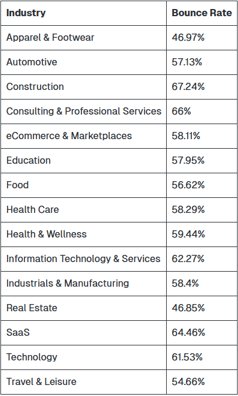
Industry Bounce Rate Benchmarks:
Role of AI UX Insights in Reducing Bounce
AI UX insights help you understand how visitors interact with your website. Using AI UX SEO tools, you can track actions like clicks, scrolls, and the time users spend on each page to uncover areas where visitors may struggle or lose interest.
These insights reduce bounce by identifying friction points, such as confusing menus or unclear buttons, and by helping you understand user intent. Knowing why visitors come to a page and what they expect allows you to adjust your design and content to meet their needs more effectively.
AI UX SEO tools also guide improvements in content layout and engagement. By placing important information where users notice it first and tracking which sections keep visitors interested, you can reduce exits. For example, if a product page has high bounce, the tools may reveal that visitors struggle to find pricing or reviews. Fixing these elements keeps users engaged and exploring your site further.
AI UX Tools to Reduce Bounce
Using the right AI UX SEO tools turns insights into practical steps that lower bounce rates and keep visitors engaged longer. Popular AI UX SEO tools include:
-
Heatmaps (Hotjar, Crazy Egg): Show where users click, scroll, and hover. Heatmaps reveal which areas attract attention, which sections are ignored, and where users may feel confused. This helps identify what to change for a smoother experience.
-
Session Replays (FullStory, Inspectlet): Let you watch real user sessions to spot navigation problems, confusing layouts, or broken elements. Replays reveal the paths users take and where they get stuck.
-
Funnel Analysis (Google Analytics, Mixpanel): Track the steps users take to complete a goal, like signing up or buying a product. Funnel analysis shows exactly where users drop off, helping you make changes that keep them moving through the site.
-
A/B Testing Tools (Optimizely, VWO): Compare different headlines, layouts, buttons, or CTAs to see what works best. This allows you to select designs that visitors respond to positively.
-
User Feedback Tools (Usabilla, Qualaroo): Collect direct feedback through surveys or polls to understand user satisfaction and identify pain points.
-
Scroll Mapping Tools (Hotjar, Crazy Egg Scrollmaps): Track how far visitors scroll down a page to see if they reach key content or drop off early.
-
Behavior Analytics Platforms (Mixpanel, Pendo): Aggregate user interactions across pages and devices to identify trends, repeated issues, or popular content areas.
By using these AI UX SEO tools together, you gain a complete picture of user behavior, detect hidden issues, and make targeted improvements that reduce bounce rate and increase engagement.
Benefits of these tools:
-
Make decisions based on real user data instead of assumptions.
-
Quickly identify what works and what doesn’t.
-
Continuously improve UX by adjusting layouts, content, or navigation.
-
Reveal hidden problems that might go unnoticed without testing.
-
Help users stay longer and explore more pages.
For instance, combining heatmaps with funnel analysis shows not just where users click, but why they leave certain pages. Session replays can reveal sections that confuse visitors or slow them down. Feedback tools highlight overlooked issues, and scroll maps indicate if important content is missed. These insights allow you to focus on changes that have the biggest impact on reducing bounce rate.
Checking these tools regularly helps track trends, measure the effects of updates, and adjust the site based on real user behavior. When combined with thoughtful UX/UI design, this approach keeps your site easier to navigate, more engaging, and less likely to lose visitors over time.
Generic UX vs. Personalized UX
|
Generic UX |
Personalized UX |
|
Same content and layout for all visitors |
Adapts content based on user behavior and preferences |
|
No focus on individual interests |
Shows content relevant to each visitor |
|
Can confuse or frustrate users |
Pages feel intuitive and easier to navigate |
|
Higher bounce rate |
Lower bounce rate because users find what they need faster |
|
Standard recommendations |
Suggests related articles, products, or popular content |
Benefits of Heatmaps for Mobile UX
Mobile users often leave quickly if a site is difficult to navigate. Heatmaps help visualize behavior on small screens:
Key insights from heatmaps:
-
Click patterns: See which buttons and links are tapped most often. This helps identify which actions users notice and which get overlooked.
-
Scroll behavior: Understand how far users scroll and which sections are ignored. Long, unengaging sections can cause visitors to leave early.
-
Attention areas: Discover where users spend the most time, highlighting content that captures interest.
How heatmaps help reduce bounce:
-
Place important CTAs and content in visible areas where users naturally focus.
-
Adjust layouts for easier thumb navigation, especially for buttons and menus on smaller screens.
-
Remove unnecessary elements that distract or confuse users, keeping pages clean and easy to interact with.
-
Prioritize content that aligns with user intent, helping visitors find what they need faster.
How to Optimize Page Speed for Lower Bounce
Slow-loading pages are one of the main reasons visitors leave a website. Studies show that most users expect pages to load within 2-3 seconds, and delays beyond this can significantly increase bounce rates. Improving page speed is essential for keeping visitors engaged and encouraging them to explore more content.
Strategies to improve page speed:
-
Compress images: Reduce file sizes without losing quality so that pages load faster, especially on mobile devices.
-
Use a CDN (Content Delivery Network): Deliver content more efficiently to users across different geographic locations, reducing delays.
-
Minify CSS, JS, and HTML: Remove unnecessary code to make pages lighter and faster to render.
-
Enable caching: Store frequently accessed resources, so returning visitors experience quicker load times.
-
Implement lazy loading: Load images, videos, or other media only when they appear on the user’s screen, reducing initial load time.
Monitoring page speed is a continuous process. Tools like Google PageSpeed Insights can help identify bottlenecks and provide actionable suggestions. Prioritizing mobile page performance is especially important, as mobile users are often less patient and more likely to leave if pages load slowly.
By applying these strategies, websites can provide a smoother, faster browsing experience, reduce bounce rates, and keep visitors engaged longer. An AI-based digital marketing agency can further support this process by combining speed improvements with insights from AI UX SEO tools, helping identify which pages and elements matter most to users for more effective optimization.
FAQs
1. What is a bounce rate in UX?
Bounce rate measures the percentage of visitors who leave a page without interacting further. A high bounce rate often signals that users are not finding the content or experience engaging.
2. How can AI improve UX?
AI can analyze user behavior, track clicks and scrolls, and provide insights to optimize navigation, content placement, and page layouts. This helps make the site more intuitive and engaging.
3. Why is page speed important for reducing bounce?
Slow-loading pages frustrate users and increase exit rates. Optimizing images, using CDNs, and minimizing code can make pages load faster, keeping visitors engaged longer.
4. How do heatmaps help understand user behavior?
Heatmaps visually show where users click, scroll, and focus on a page. They reveal which areas attract attention and which are ignored, helping improve design and content placement.
5. What role does personalization play in UX?
Personalization adjusts content based on user behavior and preferences, showing relevant articles, products, or features. This makes pages easier to navigate and reduces bounce by delivering what users want quickly.
Understanding user behavior is key to reducing bounce rates. AI UX insights, heatmaps, and page speed improvements guide effective changes. Take action to create a smoother, more engaging experience for visitors.
Digital Marketing services in Other Locations in India
Bangalore | Hyderabad | Chennai | Pune | Ahmedabad | Coimbatore | Mumbai | Kolkata | Patna | Amritsar | Indore | Kozhikode | Trivandrum | Jaipur | Nagpur | Gwalior | Dehradun | Noida | Vizag | Raipur | Agra | Gurgaon | Madurai | Udaipur | Thrissur |