How Website Monitoring Can Improve Your Site Performance?
Discover how website monitoring helps identify issues, optimize speed, and enhance user experience for better site performance.

Is your website optimized to meet the technical standards necessary for achieving high SEO rankings and a consistent user experience?
Website performance goes beyond speed. It involves delivering a smooth, secure, and consistent experience across all devices and browsers. For business websites, eCommerce platforms, or SaaS applications, ongoing monitoring is essential. This includes checking uptime, page load times, and meeting Google’s Core Web Vitals to improve search visibility and ensure a better user experience.
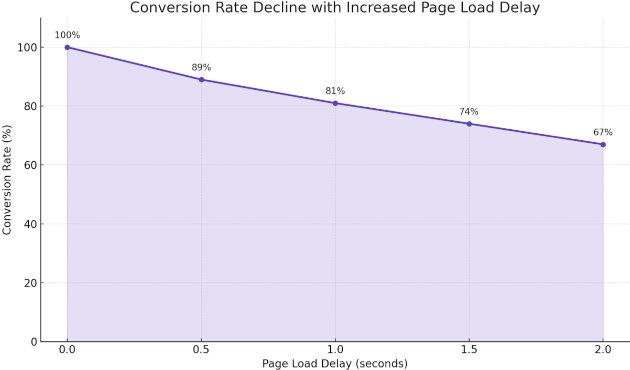
According to research published by Google, even a one-second delay in page load time can result in a conversion rate drop of up to 20%, highlighting the critical role site performance plays in user behavior and business outcomes.
What Is Site Performance?
Site performance refers to how fast and efficiently a website loads and responds to users. It directly affects user experience and search engine rankings.
Key metrics to consider:
-
Core Web Vitals
-
Server Response Time
-
Time to First Byte (TTFB)
-
JavaScript Execution
-
Page Load Speed
-
Mobile Performance
-
Bounce Rate
All these indicators are used by search engines to rank websites and by developers to benchmark improvements.
Why Website Monitoring Is Important for Performance
Website monitoring is the automated process of evaluating your site's behavior through synthetic scripts and real user data. It helps ensure that:
-
Uptime Monitoring: Checks your site is accessible to both users and search engine bots, preventing ranking drops caused by downtime.
-
Core Web Vitals Tracking: Monitoring key metrics like page load speed, interactivity, and visual stability, which are crucial SEO ranking factors for Google.
-
Error Detection: Identifying broken links, server errors (like 5xx codes), and other issues that can hurt SEO and reduce user trust.
-
Functionality Checks: Confirming that important features like contact forms, checkout pages, and navigation work smoothly to keep visitors engaged and reduce bounce rates.
-
API Response Time: Measuring how quickly APIs deliver dynamic content, which affects page speed and search engine crawling.
-
JavaScript Performance: Checking that scripts do not block page rendering or cause delays, which can negatively impact SEO since slow or broken scripts hurt crawlability and user experience.
-
HTTPS Stability: Verifying that secure connections are active and stable, supporting trust signals and avoiding penalties from search engines for insecure sites.
Key Tools to Track and Improve Website Performance
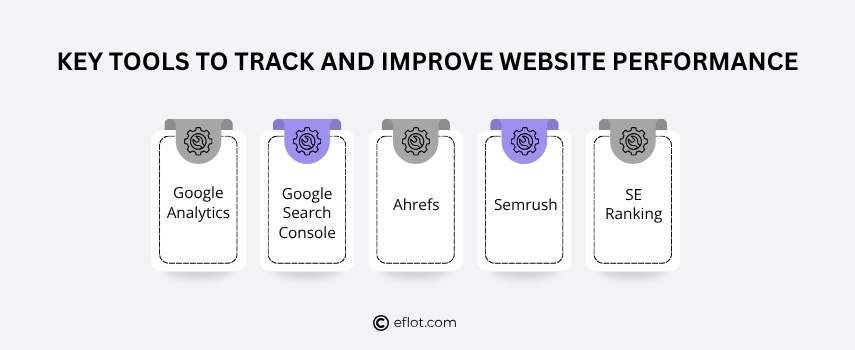
To keep your website running smoothly and rank well in search engines, it’s important to consider these tools that track different aspects of site health and user behavior. Common tools used by SEO professionals include:
-
Google Analytics
-
Tracks visitor numbers, page views, session duration, and user behavior
-
Identifies which pages perform best and where users drop off
-
Provides demographic and geographic data about your audience
-
Google Search Console
-
Monitors how Google indexes your website
-
Shows search queries driving traffic to your site
-
Alerts you to crawl errors, security issues, or penalties
-
Tracks Core Web Vitals and mobile usability
-
Ahrefs
-
Analyzes backlink profiles and identifies link-building opportunities
-
Performs site audits to find SEO errors and improvements
-
Tracks keyword rankings and competitor strategies
-
Semrush
-
Offers comprehensive keyword research and competitive analysis
-
Conducts technical SEO audits
-
Monitors paid search campaigns and social media performance
-
SE Ranking
-
SE Ranking tracks keyword rankings over time
-
Provides on-page SEO auditing and website health checks
-
Reports on backlinks and competitor SEO activities
Key Benefits of Monitoring Your Site Performance
1. Load Speed Optimization
Monitoring helps identify delays in page loading, allowing adjustments to enhance website performance and reduce bounce rates.
2. Compliance with Search Engine Metrics
Tracking Core Web Vitals and other SEO factors ensures your site meets the criteria used by search engines to rank pages.
3. Early Detection of Site Issues
Continuous monitoring catches errors like broken links, server downtime, or script failures before they impact users.
4. User Behavior Analysis
Tools provide insights into visitor interactions, helping refine navigation and content for better engagement.
5. Competitive Benchmarking
Monitoring keyword rankings and backlinks allows you to compare performance with competitors and adjust strategies.
6. Security Verification
Regular checks on HTTPS status and site security protocols protect user data and maintain trust.
7. Resource and Script Monitoring
Evaluating JavaScript execution and API response times ensures smooth functionality and prevents slowdowns.
Methods to Improve Site Performance
If your website loads slowly or has technical issues, it can hurt your search rankings. Search engines prefer fast, clean, and well-structured websites. Below are some simple and effective ways to improve your site performance and help your SEO:
-
Use File Compression: Compress your HTML, CSS, and JavaScript files so they load faster by reducing file size.
-
Minify and Combine CSS & JavaScript: Remove extra spaces and characters in your code. Combine files to lower the number of times the browser needs to request them. This helps reduce load time.
-
Upgrade to HTTP/2 or HTTP/3: These newer protocols let the browser load multiple files at once, which improves speed and efficiency.
-
Avoid Duplicate Content: Make sure your content is original and not repeated on other pages. Use canonical tags if you have similar content, so search engines know which version to index.
-
Enable Lazy Loading for Images and Videos: Load images and videos only when users scroll to them. This makes the page load faster for visitors.
-
Preload Critical Files: Use tags like or to help the browser load important resources first.
Site Performance and Its Impact on SEO Rankings
Search engines measure a website’s technical performance when determining how to rank it. A fast, stable site improves several core areas of SEO:
Faster Crawling
-
A well-optimized site loads quickly, allowing search engine bots to crawl more pages within a limited crawl budget.
-
This improves indexing coverage and content visibility.
Core Web Vitals Compliance
-
Largest Contentful Paint (LCP) reflects how quickly the main content loads.
-
First Input Delay (FID) measures responsiveness.
-
Cumulative Layout Shift (CLS) monitors visual stability.
Lower Bounce Rates
-
Users tend to leave slow-loading sites quickly.
-
A high bounce rate may indicate a poor experience, which can negatively influence rankings.
Mobile Performance
-
Google’s mobile-first indexing gives preference to mobile speed and usability.
-
Poor mobile load times can reduce visibility in search results.
Time to First Byte (TTFB)
-
Faster TTFB supports better crawl efficiency.
-
A quick server response helps render pages faster, improving SEO.
Better User Engagement
-
Fast websites encourage users to stay longer and view more pages.
-
Improved engagement metrics can improve overall SEO performance.
FAQs
1. What is website monitoring?
Website monitoring is the process of regularly checking a website’s performance, uptime, speed, and key technical functions. It helps detect issues like downtime, slow loading pages, or broken features that can affect user experience and search engine rankings.
2. Which tool analyzes website SEO?
Google Search Console is one of the most widely used tools for analyzing website SEO. It tracks search traffic, keyword rankings, crawl issues, Core Web Vitals, and indexing status—giving detailed insights to help improve a site's visibility in search results.
3. How do I check the SEO performance of my website?
You can check your website’s SEO by using tools like Google Search Console, Ahrefs, or SEMrush. These platforms audit your website for technical errors, keyword performance, backlinks, and mobile usability. They also provide recommendations to improve search engine rankings.
4. Does site performance affect SEO?
Yes, site performance directly impacts SEO rankings. Metrics such as page load time, Core Web Vitals, and server response speed influence how search engines assess your site. A high-performing website improves crawlability, reduces bounce rates, and supports better visibility in search results.
5. How to measure site performance?
Site performance is measured using metrics like Time to First Byte (TTFB), Largest Contentful Paint (LCP), and First Input Delay (FID). Tools such as Google PageSpeed Insights, Lighthouse, and GTmetrix help track these indicators and provide suggestions for optimization.
Website performance directly affects how search engines view and rank your site. A well-optimized structure, stable loading behavior, and consistent user experience all contribute to better visibility in search results.
Monitoring tools help identify issues early, whether it’s slow server response, rendering delays, or mobile usability problems. Addressing these helps your site stay accessible and search-friendly.
Investing in ongoing performance checks supports stronger SEO outcomes and more meaningful user engagement over time.
Want to increase your website traffic and connect with more local customers? Email us at [email protected] to learn how we can help.
Digital Marketing services in Other Locations in India
Bangalore | Hyderabad | Chennai | Pune | Ahmedabad | Coimbatore | Mumbai | Kolkata | Patna | Amritsar | Indore | Kozhikode | Trivandrum | Jaipur | Nagpur | Gwalior | Dehradun | Noida | Vizag | Raipur | Agra | Gurgaon | Madurai | Udaipur | Thrissur |