How to Perfect Your Google Ad Settings Easily
Learn how to perfect your Google Ad settings easily with simple tips to improve targeting, save money, boost PPC performance, and get better leads and sales now.

Are your Google Ads bringing real customers, or spending money but not seeing good results?
Google Ads can help your business grow fast, but only if the settings are done correctly. Small mistakes in budget, targeting, or keywords can waste money and reduce results.
Here, I will guide you to learn simple ways to improve your Google Ad settings, run better PPC campaigns, and get more leads and sales.
What Google Ads Is
Google Ads is an online advertising platform created by Google that helps businesses promote their products and services on the internet. It is a popular part of Digital Marketing because it allows businesses to reach people exactly when they are searching for related products or services. Many businesses and Digital Marketing Agencies use Google Ads to get quick traffic, leads, and sales.
With Google Ads, businesses can show ads on:
-
Google search results pages
-
Websites that are part of Google’s Display Network
-
YouTube videos and apps
How Google Ads Works
Google Ads works through a smart system that decides which ads appear and when. When someone searches for a keyword on Google, an auction takes place to show the most relevant ads. The system looks at multiple factors, not just how much you bid.
Here’s how the process works step by step:
-
Businesses choose keywords related to their products or services
-
They set a daily budget and bidding strategy
-
Google checks ad relevance, bid amount, and quality score
-
The best ads appear at the top or bottom of search results
Key elements involved in how Google Ads works:
-
Keywords – Words or phrases users search for on Google
-
Bids – The maximum amount you are willing to pay per click
-
Quality Score – Measures ad relevance, keyword quality, and landing page experience
-
Ad Rank – Decides ad position based on bid and quality score
Types of Google Ads
Google Ads offers different ad types to match various business goals and marketing needs. Each type helps brands connect with customers in unique ways. A Digital Marketing Agency often chooses the best ad format based on audience behavior and budget.
-
Search Ads: These ads appear at the top of Google search results when users search for specific keywords. They are highly effective PPC ads for generating leads and sales.
-
Display Ads: Display ads are banner-style ads shown on websites and apps across Google’s network. They are useful for brand awareness and reaching wider audiences.
-
Shopping Ads: Shopping ads show product images, prices, and store details directly in Google search. These are best for e-commerce businesses using PPC Services to boost product sales.
-
Video Ads: Video ads appear on YouTube and video partner sites. They help businesses engage audiences with visual storytelling and strong branding.
-
App Promotion Ads: These ads help promote mobile apps across Search, Play Store, and YouTube. They are great for businesses focused on digital growth through Digital Marketing.
Importance of Setting Goals Before Running Ads
Before starting Google Ads, businesses must clearly define what they want to achieve. Goals guide your campaign settings and help avoid wasted budget. A Digital Marketing Agency always focuses on goal-based PPC planning for better results.
-
Choose the Right Objective: Goals may include website traffic, leads, sales, or brand awareness. Selecting the right objective ensures your Google Ads campaign is aligned with business needs.
-
Better Budget Planning: When goals are clear, you can decide how much to spend wisely. This reduces unnecessary PPC costs and improves campaign efficiency.
-
Improved Targeting Strategy: Setting goals helps target the right audience based on intent and behavior. It improves performance and increases conversion chances.
-
Easier Performance Tracking: Goals help measure success through conversions, calls, purchases, or sign-ups. This makes PPC Services more result-oriented and data-driven.
-
Helps in Campaign Optimization: With clear goals, businesses can adjust bids, ads, and keywords easily. This leads to better outcomes and long-term growth in Digital Marketing.
Why Google Ad Settings Matter for Ad Performance
Google Ad settings control how your ads appear, who sees them, and how much you spend. Correct settings improve campaign success and reduce wasted money. That’s why Digital Marketing Agencies pay close attention to every setup detail in PPC campaigns.
-
Budget and Bidding Control: Proper budget settings help avoid overspending while getting enough clicks. Smart bidding improves conversions and makes PPC Services more cost-effective.
-
Target Audience Accuracy: Correct targeting ensures ads reach only interested users. This improves click-through rates and boosts campaign quality.
-
Location and Device Settings: Ads perform better when shown in the right location and on the right device. Local businesses benefit greatly from these Google Ads settings.
-
Ad Scheduling Benefits: Running ads during high-activity hours saves money and increases conversions. Scheduling is an important part of digital ad optimization.
-
Quality Score Improvement: Good settings improve relevance, landing page experience, and ad performance. Higher quality scores lead to better rankings at lower PPC costs.
How Proper Settings Help Save Money and Improve Results
Correct Google Ads settings help businesses run campaigns efficiently and reduce unnecessary spending. With expert PPC management, businesses can get better leads at lower costs. That is why Digital Marketing Agencies focus on optimization from the beginning.
-
Reduces Wasted Clicks: Proper keyword and audience targeting ensures ads reach relevant users. This saves budget and improves PPC performance.
-
Better Conversion Rates: Correct bidding and landing page setup increase chances of conversions. Businesses get more leads with the same spend.
-
Improves Ad Ranking: Better settings increase Quality Score, helping ads rank higher without extra cost. Higher ads get more clicks, with an average Google Ads CTR of 6.66% on Google Search.
-
Smart Budget Allocation: Businesses can invest more in high-performing campaigns and pause low-performing ones. This makes PPC Services more efficient.
-
Continuous Optimization: With proper settings, it becomes easier to test and improve ads regularly. This leads to long-term success in Google Ads campaigns.
Essential Google Ad Setups You Must Perfect
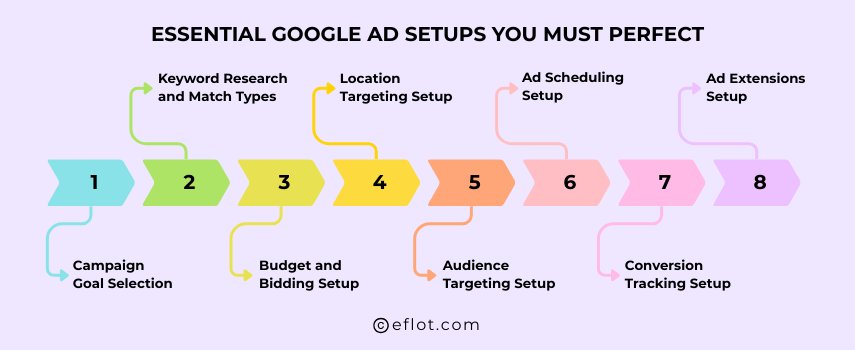
Setting up Google Ads correctly is the foundation of a successful PPC campaign. Even small mistakes in settings can lead to wasted budget and poor results. That’s why every Digital Marketing Agency focuses on perfect Google Ads setups before running or scaling PPC Services.
-
Campaign Goal Selection: Choosing the right campaign goal like leads, sales, or website traffic helps Google optimize your ads properly. Clear goals ensure your PPC campaign works toward real business outcomes instead of random clicks.
-
Keyword Research and Match Types: Selecting the right keywords and match types helps your ads show for relevant searches only. This setup reduces wasted clicks and improves overall PPC performance in Digital Marketing.
-
Budget and Bidding Setup: Proper budget and bidding settings help control ad spend and avoid overspending. Smart bidding strategies allow Google Ads to focus on conversions while maintaining cost efficiency.
-
Location Targeting Setup: Location targeting ensures your ads appear only in selected cities, regions, or countries. This is especially important for local businesses using PPC Services to attract nearby customers.
-
Audience Targeting Setup: Audience settings help target users based on interests, behavior, or past interactions. Remarketing audiences are powerful tools used by Digital Marketing Agencies to increase conversion rates.
-
Ad Scheduling Setup: Ad scheduling allows ads to run only during high-performing hours or days. This setup helps save money and improves results by targeting users when they are most active.
-
Conversion Tracking Setup: Conversion tracking measures actions like form fills, calls, or purchases. Without this setup, it is impossible to judge the success of Google Ads campaigns accurately.
-
Ad Extensions Setup: Ad extensions like call, location, and sitelinks improve ad visibility and trust. They increase click-through rates and make PPC ads more effective without extra cost.
Common Mistakes Businesses Make in Google Ads
Many businesses lose money in Google Ads due to poor planning and incorrect setup. Without expert Digital Marketing knowledge, PPC campaigns may not deliver expected results. Avoiding common mistakes can help businesses achieve better ROI.
-
No Proper Keyword Research: Choosing wrong or broad keywords attracts irrelevant clicks. This increases PPC costs without giving real business leads.
-
Skipping Conversion Tracking: Many businesses run Google Ads without tracking results. Without tracking, it becomes hard to know what is working and what is wasting money.
-
Wrong Audience Targeting: Showing ads to the wrong audience leads to low engagement. Proper targeting is essential for Digital Marketing success.
-
Ignoring Negative Keywords: Not adding negative keywords causes ads to show for unwanted searches. This is one of the biggest mistakes in PPC Services.
-
Poor Ad Copy and Landing Pages: Weak ads and slow landing pages reduce conversions. High-quality content and better user experience improve campaign results.
Tools That Help Manage Google Ads Easily
Managing Google Ads becomes easier when you use the right tools. These tools help in keyword planning, tracking performance, and improving campaign results. Digital Marketing Agencies depend on these tools for running successful PPC Services.
-
Google Keyword Planner: This tool helps find the best keywords and search volume. It is essential for building strong PPC campaigns.
-
Google Ads Editor: Ads Editor allows bulk changes and faster campaign management. It is useful for agencies handling multiple Google Ads accounts.
-
Google Analytics: Analytics tracks visitor behavior and conversion data. It helps improve landing pages and Digital Marketing strategy.
-
Google Tag Manager: Tag Manager makes conversion tracking setup simple without coding. It helps monitor PPC campaign actions accurately.
-
Performance Reports Dashboard: Google Ads reports show clicks, impressions, CPC, and ROI. These insights help optimize PPC Services for better results.
Perfecting your Google Ad settings is one of the easiest ways to improve your ad performance and get better results from your PPC campaigns. When you set the right goals, choose the correct keywords, target the right audience, and track conversions properly, you can save money and attract more customers. With the help of a Digital Marketing Agency, businesses can optimize Google Ads settings smoothly and achieve higher leads, sales, and online growth.
Digital Marketing services in Other Locations in India
Bangalore | Hyderabad | Chennai | Pune | Ahmedabad | Coimbatore | Mumbai | Kolkata | Patna | Amritsar | Indore | Kozhikode | Trivandrum | Jaipur | Nagpur | Gwalior | Dehradun | Noida | Vizag | Raipur | Agra | Gurgaon | Madurai | Udaipur | Thrissur |