















How Broken Links Damage Your Business
Broken links silently hurt your business, driving customers away and damaging your SEO. Fix them today to boost credibility, traffic, and sales!

Have you ever clicked on a link that led to a dead page? Or worse, have you discovered that your website is full of broken links? If you’re not actively managing these, you might harm your business more than you think.
60% of users abandon a website after encountering broken links, and websites with broken links are often ranked lower by Google. Ignoring these issues can result in lost revenue, a damaged reputation, and reduced web traffic.
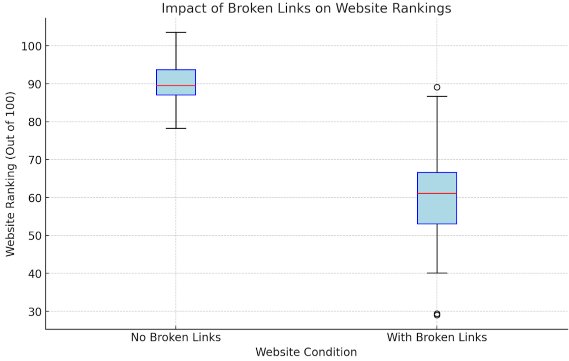
A prime example of how broken links can impact a business comes from Amazon, a leading e-commerce platform. While Amazon has invested significantly in website optimization, it’s not immune to the negative effects of Dead Links. In the past, Amazon experienced a dip in website traffic and sales due to internal Dead Links on product pages and checkout pages. These Dead Links led to a poor user experience and affected Amazon's ability to rank as highly in search engines for competitive keywords.
In response, Amazon worked with its technical team to identify and fix all Dead Links across its platform, including on product pages, reviews, and checkout processes. This resulted in improved user experience, higher conversion rates, and a recovery in their search engine rankings. By addressing Dead Links, Amazon was able to restore customer trust, boost sales, and enhance its brand credibility.
What Are Broken Links?
Broken links are links on your website that lead to pages that no longer exist, are unreachable, or have been moved without proper redirects. When a user clicks on a broken link, they typically encounter a "404 Page Not Found" error, which is frustrating for them and detrimental to your website’s performance. Dead Links can occur for several reasons: the destination page might have been deleted, the URL may have been changed without updating the link, or the server hosting the page might be down.
In terms of SEO, Dead Links are problematic because they make it harder for search engines to index your website. When Google or another search engine encounters Dead Links, it can’t crawl and index your site effectively, leading to poor visibility in search engine results pages (SERPs).
How Broken Links Damage Your Business
1. Poor User Experience
A great user experience is essential for retaining customers and generating conversions. When a potential customer clicks on a broken link, they are redirected to an error page, which negatively impacts their experience on your site. Studies show that 67% of customers are less likely to return to a website that provides a poor experience, and Dead Links are one of the easiest ways to frustrate your audience.
This poor user experience can drive visitors away, meaning they may never return to your site. As a result, you lose valuable leads and potential customers, damaging your business’s bottom line.
2. Negative Impact on SEO
Dead Links also significantly affect your website’s search engine optimization (SEO). Search engines like Google rely on internal and external links to crawl and index web pages. When Dead Links appear on your site, search engine crawlers can’t navigate your website properly, which harms your rankings. Google uses user experience and site health as ranking factors, and websites with a high number of Dead Links are considered less reliable and less authoritative.
Moreover, if external links from your site point to Dead Links, it could result in a loss of valuable backlinks. Backlinks are essential for SEO as they signal trust and authority, but if these links are broken, they become useless and could negatively impact your site’s domain authority.
3. Damaged Brand Credibility
If customers or visitors frequently encounter Dead Links on your site, they may start to question your brand’s credibility. When users encounter dead Links, they feel that the site is not properly maintained, leading to trust issues. 46% of people say that website credibility is the number one factor they consider when deciding to make a purchase online.
If your website seems outdated or unprofessional, visitors may look for more trustworthy competitors. Over time, this erosion of trust can harm your brand’s reputation and sales.
4. Loss of Revenue
Dead Links can directly affect your business's revenue, particularly if they are found on pages where users are expected to make purchases or engage with your business. For example, if a customer tries to buy a product but is met with a broken link to the checkout page, the purchase may not be completed.
Even if the broken link is on a contact page, it can prevent potential customers from reaching out, further reducing conversion opportunities.
How to Fix Broken Links
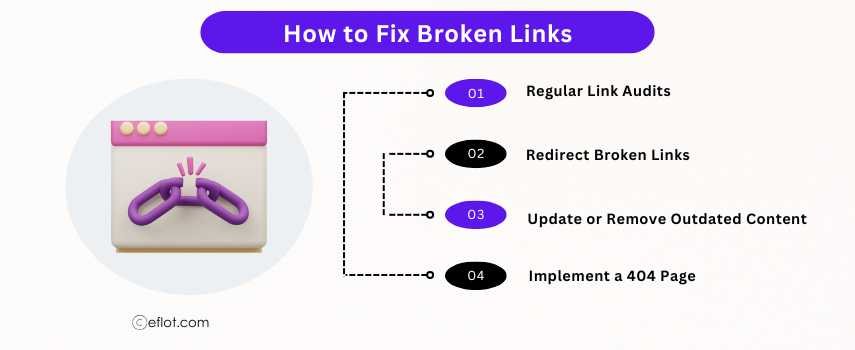
Addressing Dead Links should be a priority for every business, and thankfully, there are several steps you can take to prevent and fix them:
1. Regular Link Audits
The first step is to regularly check for Dead Links on your website. Tools like Google Search Console, Ahrefs, or Screaming Frog can help identify these links. Run regular audits to catch and fix Dead Links before they become a bigger problem.
2. Redirect Broken Links
When you remove or change a page’s URL, make sure to set up a 301 redirect to guide users and search engines to the new page. This way, even if a link is broken, the user is directed to the correct page without encountering an error.
3. Update or Remove Outdated Content
If you find Dead Links pointing to outdated content, either update the link with new information or remove the link entirely. Keeping your content and links fresh is key to maintaining both your users’ trust and your SEO rankings.
4. Implement a 404 Page
A custom 404 error page can help redirect users when they encounter Dead Links. While it’s not a solution for the broken link itself, a helpful 404 page can guide users back to the homepage or provide links to related content, improving the user experience.
Broken links are more than just a minor annoyance, they can significantly damage your business’s reputation, SEO rankings, and revenue. Regular audits, updating outdated content, and implementing redirects can help you fix these issues before they become a major problem. By addressing Dead Links proactively, you improve your site’s user experience, boost your SEO efforts, and maintain brand credibility, ultimately leading to increased sales and business growth.
If you're ready to fix your broken links and improve your website’s performance, contact us at [email protected] for expert guidance and support.
Digital Marketing services in Other Locations in India
Bangalore | Hyderabad | Chennai | Pune | Ahmedabad | Coimbatore | Mumbai | Kolkata | Patna | Amritsar | Indore | Kozhikode | Trivandrum | Jaipur | Nagpur | Gwalior | Dehradun | Noida | Vizag | Raipur | Agra | Gurgaon | Madurai | Udaipur | Thrissur |