Why Internal Links in HTML Matter for Business?
Understand how internal links in HTML help search engines, improve user flow, boost SEO rankings, and turn website visitors into customers easily.

Is it hard to get your website to show up on search engine results pages?
Or maybe you are wondering how to effectively grow your website to get them more engaged? One of the most powerful tools a company can use is internal links in HTML. This simple and easy link can improve the user experience, improve SEO, and help your company.
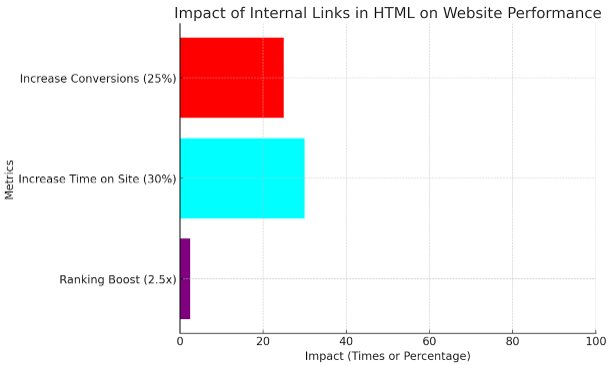
Ahrefs reported that websites that utilize internal links were 2.5 times more likely to rank in search engines. Further, businesses with established internal linking processes benefit from a 30% increase in time spent on their site and a 25% bump in conversions. The numbers don't lie when it comes to the positive impact of internal linking in HTML.
Let’s consider Amazon, one of the world’s largest e-commerce marketplaces. Amazon is a heavy user of internal links in HTML to help direct users to related products, deals, and categories. When a customer views an item, they are often shown suggestions like “Customers who bought this also bought” or links that take them to a related product.
Amazon's internal linking structure has two big advantages, it helps keep users on the site longer and satisfies buying behavior by making it more likely that someone will purchase more products. Moreover, Amazon's use of internal links gives search engines a better understanding of the relationships between different products and categories, and overall improves their SEO.
What Are Internal Links in HTML?
Internal links in HTML are hyperlinks that take you to different pages on the same website. They provide navigation between pages, and thus help to develop your web pages on the same site as well as provide a structure for the user's browsing. Internal links provide navigation from one page to another via hyperlinks, while external links take users to other sites. Internal links in HTML help both users and search engines navigate their way through your site's content.
For instance, if you have a blog post on "Content Marketing", and you link to another page on your website that is discussing "SEO Best Practices". You are linking two related pieces of content and showing a relationship to the following information, making it easier for both users and search engines to find related information.
The Importance of Internal Links for SEO
One of the most important reasons internal links in HTML matter for business is that they affect SEO. Search engines typically use links when crawling your website and trying to understand what it is about. If you use internal links in HTML properly, you are telling search engines where your important pages are, and they will help rank them more favorably on the SERPs.
Internal links also serve to transmit link equity, or authority, throughout your site. For example, if you have one page that is really high-ranking and has a lot of backlinks coming into it, if you use that high authority page to link to other pages on your website, you can share some of that authority with them. This gives your other pages more visibility and increases their chances of ranking too.
Why Internal Links in HTML Matter for Business?
-
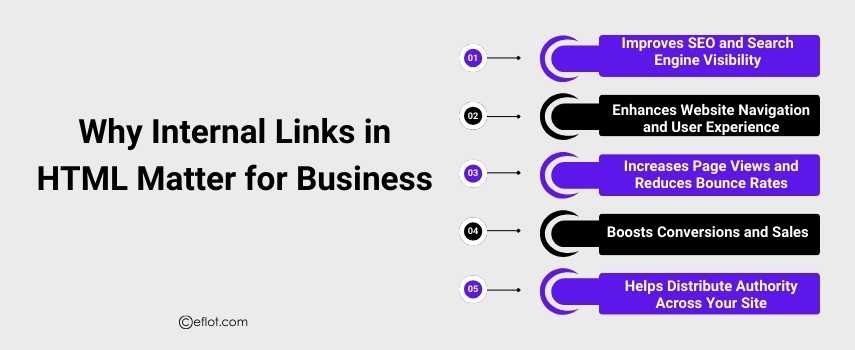
Improves SEO and Search Engine Visibility
Internal links help search engines crawl and index your site more effectively, boosting your search engine rankings and visibility. They help pass link equity across your website, ensuring that your most important pages are properly indexed and ranked.
-
Enhances Website Navigation and User Experience
Internal links allow users to navigate your website more easily, guiding them to related content. This improves user experience by helping visitors find what they are looking for faster, leading to longer site visits and increased engagement.
-
Increases Page Views and Reduces Bounce Rates
By linking to relevant content within your site, internal links encourage users to explore more pages. This keeps visitors on your site longer, reducing bounce rates and increasing overall page views, which signals search engines that your site is valuable.
-
Boosts Conversions and Sales
Internal links can guide users to key conversion points such as product pages, services, or contact forms. A well-placed internal link can direct visitors towards making a purchase or taking action, improving conversion rates and sales.
-
Helps Distribute Authority Across Your Site
Internal linking helps distribute page authority across your site. By linking high-authority pages to other relevant pages, you can ensure that all parts of your website are receiving the SEO benefits, helping them rank better and contribute to overall business growth.
Best Practices for Using Internal Links in HTML
To make the most out of internal links in HTML, consider the following best practices:
-
Use Descriptive Anchor Text: The anchor text used for internal links should clearly describe what users will find when they click the link. This helps both search engines and users understand the relevance of the linked page.
-
Link to High-Value Pages: Focus on linking to pages that are important for your business, such as high-converting product pages, landing pages, or cornerstone content.
-
Keep It Relevant: Ensure that your internal links make sense in context and lead to pages that are closely related to the current page’s topic. This keeps the user experience seamless and helpful.
-
Avoid Overloading Pages with Links: Too many internal links can be overwhelming. Aim for quality over quantity, and ensure the links you include offer value to users.
-
Use a Logical Site Structure: Organize your website’s content in a way that makes it easy for both users and search engines to navigate. A clear site structure will naturally result in more effective internal linking.
In HTML, internal links provide more than just navigation; they are a foundational component of your website's SEO and user experience. By implementing internal linking correctly, you can improve your website's architecture, boost visibility, increase conversions, and help build a successful business. Start building a solid internal linking strategy now so your business can succeed online.
Are you ready to maximize the SEO and user experience on your website with an efficient internal linking strategy? Start implementing an effective internal linking strategy today, and watch your business flourish!
Digital Marketing services in Other Locations in India
Bangalore | Hyderabad | Chennai | Pune | Ahmedabad | Coimbatore | Mumbai | Kolkata | Patna | Amritsar | Indore | Kozhikode | Trivandrum | Jaipur | Nagpur | Gwalior | Dehradun | Noida | Vizag | Raipur | Agra | Gurgaon | Madurai | Udaipur | Thrissur |