How to Make a Google Advertisement?
Learn how to create a high-converting Google advertisement with expert strategies. Optimize keywords, budget, targeting, and ad copy for maximum ROI.

When it comes to reaching potential customers online, Google Ads (formerly known as Google AdWords) is a must-have tool for any business. As a PPC specialist, I’ve seen how Google Ads can transform businesses by driving leads, sales, and visibility. Whether you’re a small business owner looking to boost your local reach or a large company aiming to dominate search results, Google Ads is one of the most powerful tools in digital marketing. But here’s the thing running successful ads isn’t just about throwing some keywords into a campaign and hoping for the best. It takes strategy, creativity, and a good understanding of the platform.
I’ll share with you the basics of creating your first Google Ad, breaking down everything from keyword research to crafting compelling ad copy and setting budgets. By the end, you’ll have the foundation you need to run an ad that doesn’t just spend your money it makes it back.
Step 1: Understand the Different Types of Google Ads
Before creating a campaign, familiarize yourself with the various types of ads available on Google Ads:
-
Search Ads: These are text-based ads that appear on Google’s search engine results page (SERP) when users search for specific keywords.
-
Display Ads: Image-based ads that appear on websites within Google’s Display Network.
-
Shopping Ads: These show product listings and prices, ideal for e-commerce businesses.
-
Video Ads: Typically shown on YouTube or partner sites, they offer engaging content.
-
App Promotion Ads: Drive users to download or interact with your mobile app.
Selecting the right ad type is key to aligning your campaign with your business goals.
Step 2: Define Your Goals and Budget
Digital marketing strategies are most effective when they begin with clear goals. Ask yourself: What do I want to achieve with this Google ad?
-
Brand Awareness: If you want more people to know about your brand, Display Ads or Video Ads might be your best bet.
-
Lead Generation: For businesses looking to collect customer information, Search Ads targeting intent-driven keywords will be more effective.
-
Sales and Conversions: Shopping Ads work well for e-commerce while retargeting ads help convert existing leads.
Once you’ve defined your objective, set a realistic budget. With pay-per-click (PPC) advertising, you only pay when someone interacts with your ad, making it a cost-effective strategy. Allocate a budget based on your desired ROI and expected conversion rates.
Step 3: Conduct Keyword Research
Keywords are the backbone of any successful Google Ads campaign. Effective search engine marketing (SEM) involves targeting keywords that reflect user intent.
Here’s how to conduct keyword research:
-
Use tools like Google Keyword Planner, Ahrefs, or SEMrush to identify keywords with high search volume and low competition.
-
Focus on long-tail keywords, as they typically have higher intent and lower competition.
-
Analyze competitor campaigns to find keyword opportunities they may be targeting.
For example, if you run an online bookstore, rather than targeting general keywords like “books,” consider long-tail options like “best mystery novels for adults.”
Step 4: Create a Compelling Ad Copy
Your ad copy plays a significant role in pay-per-click advertising success. Since you’re competing against other advertisers, your text needs to stand out and drive clicks.
Tips for Writing Effective Ad Copy:
-
Include Keywords: Incorporate your primary keyword in the headline and description to improve relevance.
-
Highlight Benefits: Instead of focusing solely on features, emphasize the benefits your product or service offers.
-
Use Calls to Action (CTAs): Phrases like “Shop Now,” “Get a Quote,” or “Sign Up Today” encourage immediate action.
-
Leverage Ad Extensions: Add extra information like site links, contact details, or promotions using ad extensions to increase visibility.
Here’s a quick example of optimized ad copy:
Headline: Free Shipping on Mystery Novels | Top Rated Books
Description: Discover gripping stories and page-turning thrillers. Free shipping on orders over $50. Shop now and start your next adventure!
Step 5: Set Up Ad Groups and Targeting Options
Organize your campaign into ad groups that target specific keywords. This improves relevance and quality score, which can lower your cost-per-click (CPC) and improve ad placements.
Key Elements of Targeting:
-
Geographic Targeting: Define where you want your ads to appear. For example, a local business may target only users within a specific city.
-
Demographic Targeting: Narrow down your audience based on age, gender, or household income.
-
Device Targeting: If mobile users are more likely to convert, prioritize mobile device ads.
-
Audience Targeting: Use remarketing lists to show ads to users who have previously visited your website.
By refining these options, you ensure that your ads reach users who are most likely to convert.
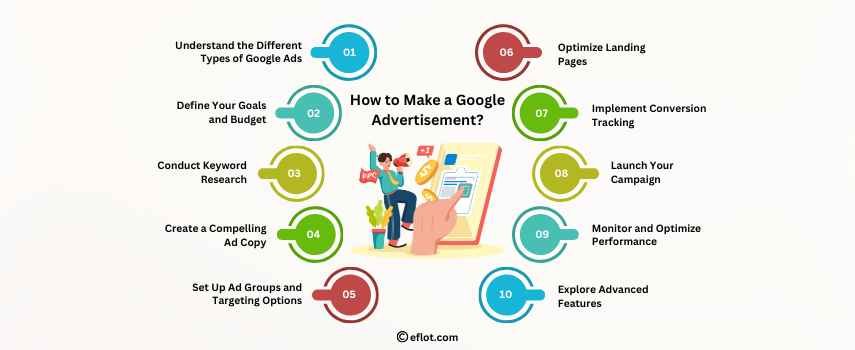
Step 6: Optimize Landing Pages
Your ad is only half the battle. The landing page users arrive on after clicking your ad plays a crucial role in converting them.
Best Practices for Landing Pages:
-
Match the Message: Ensure that the landing page aligns with the ad’s message and keywords.
-
Clear Call to Action: Make it easy for visitors to take action, whether it’s filling out a form, making a purchase, or signing up.
-
Fast Load Times: A slow-loading page can increase your bounce rate and lower your ad performance.
-
Mobile-Friendly Design: Since many users browse on their phones, ensure your landing page is optimized for mobile devices.
Step 7: Implement Conversion Tracking
Without proper tracking, it’s impossible to gauge whether your campaign is working effectively. Set up conversion tracking to monitor key actions such as:
-
Form submissions
-
Purchases
-
Phone calls
-
Newsletter sign-ups
Use Google Tag Manager or integrate tracking directly within the Google Ads platform. Additionally, consider setting up Google Analytics to gain deeper insights into user behavior and refine your digital marketing strategy accordingly.
Step 8: Launch Your Campaign
Once everything is set up, it’s time to launch your campaign. Before going live, double-check the following:
-
Correct budget and bidding strategy
-
Targeting settings
-
Ad copy accuracy and keyword alignment
-
Proper conversion tracking setup
Click the “Enable” button, and your campaign will begin running.
Step 9: Monitor and Optimize Performance
Launching your Google ad campaign isn’t the final step—constant monitoring and optimization are necessary to achieve long-term success. Digital marketers often rely on performance metrics to make data-driven improvements.
Key Metrics to Track:
-
Click-Through Rate (CTR): Measures how often people click on your ad after seeing it.
-
Quality Score: A Google rating based on the relevance of your ads, keywords, and landing pages.
-
Cost-Per-Click (CPC): How much do you pay per click?
-
Conversion Rate: The percentage of users who take the desired action.
-
Return on Ad Spend (ROAS): The overall profitability of your campaign.
Common Optimization Techniques:
-
Adjust bids based on keyword performance.
-
Refine ad copy to improve CTR.
-
Add negative keywords to filter out irrelevant searches.
-
Conduct A/B testing on landing pages and CTAs.
Step 10: Explore Advanced Features
Once you’re comfortable with the basics, explore advanced Google Ads features to enhance your campaigns further:
-
Dynamic Search Ads: Automatically generate ads based on website content.
-
Responsive Search Ads: Provide multiple headlines and descriptions, and Google will automatically test combinations.
-
Remarketing Campaigns: Reconnect with users who have already visited your site.
-
Google Ads Scripts: Automate repetitive tasks like bid adjustments or keyword monitoring.
Creating a successful Google advertisement involves more than just setting up an ad and hoping for the best. It requires meticulous planning, keyword research, ongoing optimization, and strategic targeting. As you build your Google Ads campaign, remember that patience and testing are key every business has a learning curve.
By following this guide, you’ll be better equipped to navigate the world of pay-per-click advertising and achieve meaningful results for your business.
Digital Marketing services in Other Locations in India
Bangalore | Hyderabad | Chennai | Pune | Ahmedabad | Coimbatore | Mumbai | Kolkata | Patna | Amritsar | Indore | Kozhikode | Trivandrum | Jaipur | Nagpur | Gwalior | Dehradun | Noida | Vizag | Raipur | Agra | Gurgaon | Madurai | Udaipur | Thrissur |