What is Web Design?
Learn the basics of web design, including its principles, tools, techniques, and how it helps create engaging and functional websites.

What is web design, and why does it matter so much in the digital world? Whether you’re exploring online shopping, reading a blog, or interacting with a service, every aspect of your experience is shaped by web design. But what exactly does this term encompass, and how does it impact users and businesses alike?
In simple terms, web design refers to the art and science of creating visually appealing, user-friendly, and functional websites. It involves layout planning, typography, color schemes, and interactive elements, all designed to enhance user experience. From large corporations to small startups, web design plays a pivotal role in establishing an online presence and driving success in the digital era.
Curious about how web design blends creativity with technology to shape the online world? Get ready to dive deeper into its core elements, the tools professionals use, and insights from experts like Jeffrey Zeldman, often called the “godfather of web standards.”
Understanding Web Design
Web design refers to the process of creating and designing websites. It encompasses everything from the visual aspects like layout, color schemes, and typography, to the functionality and user experience (UX) aspects. A well-designed website is visually appealing, easy to navigate, and provides a seamless experience for its users.
Unlike web development, which focuses on coding and backend functionality, web design is more about the aesthetics and usability of a site. However, these two disciplines often overlap and work together to bring a website to life.
Key Elements of Web Design
A successful web design integrates several elements to ensure the website meets its goals. Here are the core components that make up web design:
-
Layout: The layout is the foundation of any website. It’s about arranging text, images, and other content in a way that’s visually appealing and easy to understand. A cluttered or poorly organized layout can drive visitors away.
-
Color Scheme: Colors have a significant impact on how a website is perceived. The choice of colors should align with the brand’s identity and create a cohesive visual experience. For example, a healthcare website might use calming blues and whites, while an entertainment website might opt for bold and vibrant colors.
-
Typography: Typography is about choosing the right fonts and font sizes. It ensures readability and helps convey the brand’s personality. For instance, a corporate website might use clean and professional fonts, while a creative portfolio might experiment with artistic typography.
-
Imagery and Media: Visual elements like images, videos, and graphics enhance a website’s appeal. High-quality and relevant visuals can capture attention and communicate messages effectively.
-
Navigation: Navigation refers to how users move through a website. A well-designed navigation system, such as menus and links, ensures that visitors can find what they’re looking for quickly and effortlessly.
-
User Interface (UI): The UI focuses on ensuring the website’s navigation is intuitive and straightforward. It involves designing buttons, menus, and other interactive elements.
-
User Experience (UX): User experience is a critical aspect of web design. It focuses on making the website intuitive and enjoyable to use. This involves understanding the target audience’s needs and designing the site accordingly.
-
Responsiveness: With the increasing use of smartphones and tablets, websites need to be responsive. This means the design adapts seamlessly to different screen sizes and devices, providing a consistent experience across platforms.
The Role of a Web Designer
A web designer is responsible for creating the visual design and layout of a website. They use various tools and software, such as Adobe XD, Figma, or Sketch, to create mockups and prototypes. Web designers also collaborate with developers, content creators, and marketers to bring the website to life.
Web designers need to possess a mix of technical and creative skills. They must understand design principles, have a keen eye for detail, and stay updated with the latest trends and technologies.
Types of Web Design
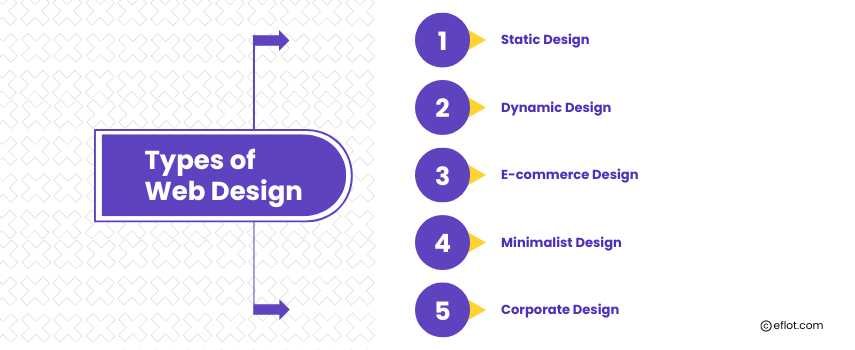
Web design is not a one-size-fits-all approach. Depending on the purpose and audience, different styles of web design may be used. Here are some popular types:
1. Static Design
A static website is simple and contains fixed content. It’s ideal for small businesses or individuals who need a straightforward online presence without frequent updates.
2. Dynamic Design
Dynamic websites are more complex and interactive. They use content management systems (CMS) like WordPress or Joomla, allowing content updates without coding knowledge.
3. E-commerce Design
E-commerce websites are designed for online stores. They focus on providing a seamless shopping experience, with features like product listings, a shopping cart, and secure payment gateways.
4. Minimalist Design
The minimalist design emphasizes simplicity and clean layouts. It avoids unnecessary elements and focuses on functionality, making it ideal for portfolios and blogs.
5. Corporate Design
Corporate websites require a professional and polished look. They are often used by businesses to showcase their services, teams, and achievements.
Importance of Web Design
Investing in good web design is crucial for several reasons:
-
First Impressions Matter: Your website is often the first interaction potential customers have with your brand. A well-designed site can create a positive impression and build trust.
-
Improved User Experience: A user-friendly website ensures visitors can easily find what they need. This reduces bounce rates and increases the chances of conversions.
-
SEO Benefits: Good web design supports search engine optimization (SEO). For instance, mobile responsiveness and fast loading speeds are essential ranking factors on search engines like Google.
-
Competitive Advantage: In a crowded digital landscape, a unique and professional web design can set you apart from competitors.
-
Brand Identity: A consistent design reinforces your brand identity, making it easier for customers to recognize and remember your business.
Trends in Web Design
Web design is constantly evolving. Staying updated with trends can help ensure your website remains relevant and engaging. Here are some popular trends in web design:
1. Dark Mode
Dark mode designs reduce eye strain and give websites a modern look. Many users prefer this option, especially for mobile browsing.
2. Micro-Interactions
Small animations or interactions, like hover effects or loading indicators, add personality and enhance user engagement.
3. 3D Elements
Three-dimensional visuals create depth and a more immersive experience. This trend is particularly popular in gaming and product showcase websites.
4. Voice User Interface (VUI)
With the rise of voice assistants like Alexa and Siri, integrating voice functionality into websites is becoming increasingly common.
5. Sustainability
Eco-friendly web design focuses on reducing the environmental impact of websites by optimizing performance and minimizing resource usage.
Tools and Software for Web Design
Web designers rely on a variety of tools to bring their ideas to life. Some popular web design tools include:
-
Adobe Creative Suite: Photoshop, Illustrator, and XD for design and prototyping.
-
Figma: A collaborative interface design tool.
-
Canva: A beginner-friendly platform for creating graphics.
-
Webflow: A tool for designing and developing websites without coding.
-
WordPress: A CMS for building dynamic and customizable websites.
How to Get Started with Web Design
If you’re interested in pursuing a career or project in web design, here’s how to start:
1. Learn the Basics
Understand the fundamentals of web design, such as layout principles, color theory, and typography. Online resources, tutorials, and courses can help you get started.
2. Master Design Tools
Familiarize yourself with popular design software. Start with beginner-friendly tools like Canva before moving on to more advanced platforms like Figma or Adobe XD.
3. Study Web Development Basics
While web design and web development are distinct, knowing some HTML, CSS, and JavaScript can be helpful.
4. Build a Portfolio
Create sample projects to showcase your skills. A portfolio is essential for attracting clients or employers.
5. Stay Updated
Web design is ever-changing, so continuously learn and adapt to new trends and technologies.
Web design is a vital aspect of the digital world, combining creativity and functionality to create meaningful online experiences. Whether you’re a business owner looking to establish an online presence or an aspiring designer, understanding the basics of web design is essential. By focusing on elements like layout, user experience, and responsiveness, you can create websites that not only look good but also achieve their intended purpose.
Remember, a great website isn’t just about aesthetics; it’s about delivering value to users and leaving a lasting impression. With the right approach and tools, you can harness the power of web design to succeed in the digital world.
Digital Marketing services in Other Locations in India
Bangalore | Hyderabad | Chennai | Pune | Ahmedabad | Coimbatore | Mumbai | Kolkata | Patna | Amritsar | Indore | Kozhikode | Trivandrum | Jaipur | Nagpur | Gwalior | Dehradun | Noida | Vizag | Raipur | Agra | Gurgaon | Madurai | Udaipur | Thrissur |