SEO Extensions Every Marketer Should Know
Discover essential SEO extensions for marketers to enhance keyword research, analytics, and optimization strategies effectively.

Having the appropriate tools on hand is often essential to staying ahead of the curve in the frequently shifting field of digital marketing, where algorithms are always changing and competition is strong. In my experience, utilizing SEO extension is one of the most straightforward yet effective strategies to increase SEO efforts. Imagine being able to monitor rankings, evaluate keywords, improve on-page content, and research competitors without ever switching tabs. I've worked with more tools than I can remember as a digital marketing specialist, and I cannot stress enough how groundbreaking a quality SEO can be.
These extensions offer real-time insights and streamlined analysis, providing a one-click solution to tasks that used to take multiple steps. But let’s be honest there are hundreds of SEO tools and extensions out there, and not all of them live up to the hype. So, which extensions truly stand out and add real value? Here, I’ll take you through the top extensions that every marketer should have in their toolkit, share what makes each one essential, and show how they can supercharge your digital marketing strategy. From keyword discovery to page optimization and competitive analysis, these extensions are designed to save you time and maximize your impact. If you’re ready to elevate your SEO game and take your strategy to new heights, look these tools could be the difference maker you’ve been waiting for.
What is an SEO Extension?
An SEO extension is a browser add-on that helps digital marketers analyze, optimize, and track website performance in search engine results. These tools integrate directly into browsers, providing instant access to essential SEO data without needing to leave the page or navigate complex software. From displaying keyword metrics to analyzing backlinks and identifying technical issues, extensions simplify the process, making it easier to perform comprehensive SEO tasks with just a few clicks.
Importance of SEO Extensions in Digital Marketing
SEO extensions are vital for digital marketers because they streamline critical processes, reduce workload, and provide real-time insights essential for making informed decisions. In a digital environment where search engine algorithms and ranking factors are constantly changing, extensions keep marketers updated with the latest information, allowing them to adapt and refine strategies quickly. By using a reliable extension, marketers can easily access keyword data, competitor insights, backlink analysis, and technical SEO features, all of which contribute to a more efficient and effective SEO workflow.
Benefits of Using SEO Extensions
-
Enhanced Efficiency: With extensions, marketers can access valuable data instantly within their browser, saving time that would otherwise be spent switching between different tools or software.
-
Real-Time Insights: These extensions provide on-the-spot data, such as keyword performance, page rankings, and traffic metrics, allowing for quick and informed decision-making.
-
Competitive Analysis: Many extensions offer tools for assessing competitors’ websites, providing insights into their keyword strategy, backlink profile, and on-page optimization tactics.
-
Improved Content Optimization: Extensions help identify keyword density, content readability, and on-page SEO factors, allowing marketers to create content that’s optimized for both search engines and users.
-
Technical SEO Checks: Certain extensions are designed to identify technical issues like broken links, page load times, and mobile-friendliness, helping ensure a website is well-optimized and user-friendly.
Top 6 SEO Extensions For Success
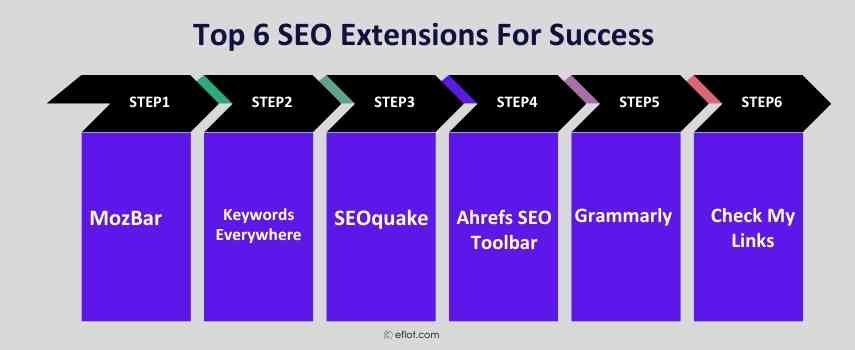
Here’s a breakdown of some of the most effective extensions that have helped marketers like myself gain insights, drive traffic, and optimize websites.
1. MozBar
MozBar is a powerful extension by Moz that gives you instant access to metrics for any website or search result page. With MozBar, you can see the Domain Authority (DA), Page Authority (PA), and backlink profile of any site you visit. It also allows you to analyze page elements, keywords, and page optimization data. MozBar is ideal for quickly assessing the strength of a site, checking for keyword relevance, and understanding the competitive environment.
2. Keywords Everywhere
Keywords Everywhere is an invaluable extension for keyword research. It shows search volume, cost-per-click (CPC), and competition data directly in your browser when you conduct a Google search. This extension is especially useful for finding new keywords and understanding their relevance and competitiveness in real-time.
3. SEOquake
SEOquake by SEMrush is another powerful extension that offers an extensive set of features. It provides insights into traffic metrics, keyword density, internal and external links, and more. With SEOquake, you can conduct a complete SEO audit of any webpage and gain insights into competitor analysis.
4. Ahrefs SEO Toolbar
Ahrefs is one of the most respected names in SEO, and their extension offers valuable insights into any webpage. The Ahrefs SEO Toolbar provides data on organic traffic, backlinks, keywords, and ranking difficulty. This extension is particularly helpful for analyzing competitors and understanding how different pages rank for keywords.
5. Grammarly
While Grammarly is primarily known as a grammar checker, it is also a fantastic extension for content optimization. Quality content is key for SEO, and Grammarly helps ensure your content is clear, engaging, and error-free. Its readability and tone suggestions enhance the overall quality of your content, which contributes to better user experience and SEO performance.
6. Check My Links
Check My Links is a simple yet powerful extension that quickly scans a webpage and highlights broken links. This is incredibly helpful for link building and on-page SEO, as broken links can harm user experience and SEO rankings. By fixing broken links, you can improve the quality of your site and enhance its SEO performance.
How to Choose the Right SEO Extensions for Your Needs
While each SEO extension on this list has its strengths, it’s essential to choose the ones that align best with your marketing goals. For example, if keyword research is a primary focus, then extensions like Keywords Everywhere and Ahrefs Toolbar will be invaluable. If you’re looking to improve on-page SEO, tools like SEOquake and Check My Links might be more suitable.
By integrating a mix of these extensions, you can cover multiple aspects of SEO from keyword optimization and competitor analysis to page speed and content quality. The right combination of tools can streamline your workflow, improve efficiency, and ultimately boost your website’s visibility.
Case Studies
Case Study 1:
Boosting Organic Traffic for a Small E-commerce Store
Greenleaf Organics, a small e-commerce store specializing in organic skincare products, struggled to compete against larger brands in search rankings. They wanted to increase their organic visibility, especially for keywords related to “organic skincare,” “natural face masks,” and “chemical-free moisturizers.” With limited resources, they needed a cost-effective strategy to gain traction in search results.
Challenges:
Greenleaf Organics faced stiff competition from established brands with larger budgets and higher domain authority. Additionally, they lacked in-depth keyword research and a clear understanding of which keywords could drive traffic to their site. They needed to identify the right keywords and understand how to optimize their pages better to compete in search results.
Solutions:
The team at Greenleaf Organics started using two key SEO extensions
MozBar and Keywords Everywhere.
-
MozBar: This extension allowed them to assess the Domain Authority (DA) and Page Authority (PA) of competitor sites directly in the search results. By analyzing competitors, Greenleaf Organics could identify gaps and determine where they could realistically compete. MozBar’s on-page analysis also helped them identify which pages needed improvement, guiding them in optimizing product pages with better keyword usage, meta descriptions, and headers.
-
Keywords Everywhere: With this extension, they gained insights into search volume, competition, and cost-per-click for various keywords. They discovered high-search, low-competition keywords like “organic face mask for sensitive skin” and “chemical-free moisturizer,” which allowed them to target niche terms with a better chance of ranking.
Case Study 2:
Improving Content Engagement and SEO for a Tech Product
A SaaS company specializing in project management software, TaskPro, wanted to grow its blog traffic and increase engagement on content related to project management tips, productivity, and team collaboration. The goal was to attract high-quality leads who were likely to convert to paying customers. However, with many other tech companies targeting the same audience, standing out in search rankings was a significant challenge.
Challenges:
TaskPro’s main challenge was optimizing blog content for SEO and readability while ensuring that it resonated with its target audience. The team needed insights into high-performing keywords, relevant backlinks, and content optimization techniques to rank their blog posts higher in search engines and engage readers effectively.
Solutions:
TaskPro used two powerful SEO extensions.
Ahrefs SEO Toolbar and Grammarly.
-
Ahrefs SEO Toolbar: The toolbar allowed the TaskPro team to analyze competitor content, track organic traffic, and evaluate backlink profiles. By examining the top-ranking pages for “project management tips” and similar terms, they identified which content pieces were driving traffic to competitors. The Ahrefs toolbar provided data on keyword difficulty and search volume, helping TaskPro select terms like “remote team collaboration tips” and “project management checklist” that were both relevant and attainable.
-
Grammarly: To ensure that content was engaging and polished, the team used Grammarly’s extension to improve readability and eliminate grammatical errors. Grammarly’s tone and clarity suggestions helped them craft blog posts that were not only informative but also easy to read, boosting engagement and time spent on each page.
For digital marketers, extensions are more than just convenient tools, they’re essential assets for gaining insights, improving efficiency, and driving results. By leveraging these extensions, you can make informed decisions, optimize content effectively, and stay ahead of competitors. With so many options available, experimenting with different extensions can help you find the perfect toolkit tailored to your needs.
Whether you’re a seasoned marketer or just starting, incorporating the right SEO extension into your strategy can be a game-changer, helping you achieve better rankings and grow your online presence. Explore, experiment, and see how these extensions can elevate your SEO game.
Digital Marketing services in Other Locations in India
Bangalore | Hyderabad | Chennai | Pune | Ahmedabad | Coimbatore | Mumbai | Kolkata | Patna | Amritsar | Indore | Kozhikode | Trivandrum | Jaipur | Nagpur | Gwalior | Dehradun | Noida | Vizag | Raipur | Agra | Gurgaon | Madurai | Udaipur | Thrissur |